

Discover what automation bots are, how they work, and the best types for your business. A practical 2026 guide to choosing and implementing automation bots.
Automation Bots Explained: What They Are, How They Work, and How to Use Them in 2026
Every business, from a two-person startup to a global enterprise, now spends a meaningful chunk of its week on repetitive digital tasks — copying data between spreadsheets, replying to routine emails, chasing invoices, or updating the same three systems with the same information. Automation bots exist to take that work off human hands.
If you’ve heard the term thrown around in meetings but you’re not entirely sure what separates a simple automation bot from a chatbot, an AI agent, or a full robotic process automation (RPA) platform, you’re not alone. This guide breaks down exactly what automation bots are, how they work, the different types available in 2026, and how to choose and implement the right one for your team — without the jargon.
What Are Automation Bots?
Automation bots are software programs designed to carry out repetitive, rule-based digital tasks automatically, without a human needing to perform each step manually. They can click buttons, fill in forms, move files, send messages, extract data, or trigger other software — essentially replicating actions a person would otherwise do at a keyboard, but faster, at scale, and without fatigue or error.
Unlike general-purpose software, an automation bot is built around a specific trigger-and-action logic:
- Trigger — an event that starts the bot (a new email arriving, a form being submitted, a scheduled time being reached)
- Action — what the bot does in response (extracting data, sending a notification, updating a record, generating a report)
- Condition (optional) — logic that decides which action to take based on the situation (“if the invoice is over £500, route it to a manager for approval”)
This trigger-condition-action structure is what makes automation bots so flexible. The same underlying concept can power a bot that replies to customer support tickets, one that scrapes competitor pricing daily, or one that reconciles bank transactions overnight.
A Quick Definition Recap
An automation bot is a piece of software configured to perform a defined sequence of digital actions automatically, in response to a trigger, without ongoing human input.
That’s the core idea. Everything else — machine learning, natural language processing, RPA “screen scraping” — is a layer added on top to make bots smarter about how they interpret the task and what they can handle.
How Automation Bots Actually Work
Most automation bots follow a similar operational cycle, regardless of what platform built them:
- Monitoring – The bot watches a source (an inbox, a database, an API, a folder, a webpage) for a defined trigger event.
- Interpretation – It reads the relevant data (a new row, an incoming message, a changed file) and checks it against pre-set rules or conditions.
- Execution – The bot performs the assigned action — this might involve interacting with a user interface (clicking, typing), calling an API, or manipulating a file or database directly.
- Logging – Most reliable bots record what they did, when, and with what result, so a human can audit or troubleshoot later.
- Escalation (when needed) – If the bot encounters something it can’t handle — an unexpected format, a failed step, an ambiguous case — well-designed bots hand the task back to a person rather than guessing.
Bots typically connect to other tools in one of two ways:
- API-based integration — the bot talks directly to another system’s application programming interface, which is faster and more stable (used by platforms like Zapier and Make).
- UI-based automation — the bot interacts with the visible interface of an application exactly as a human would, useful for legacy systems that don’t offer an API (this is the traditional territory of RPA tools).
Types of Automation Bots
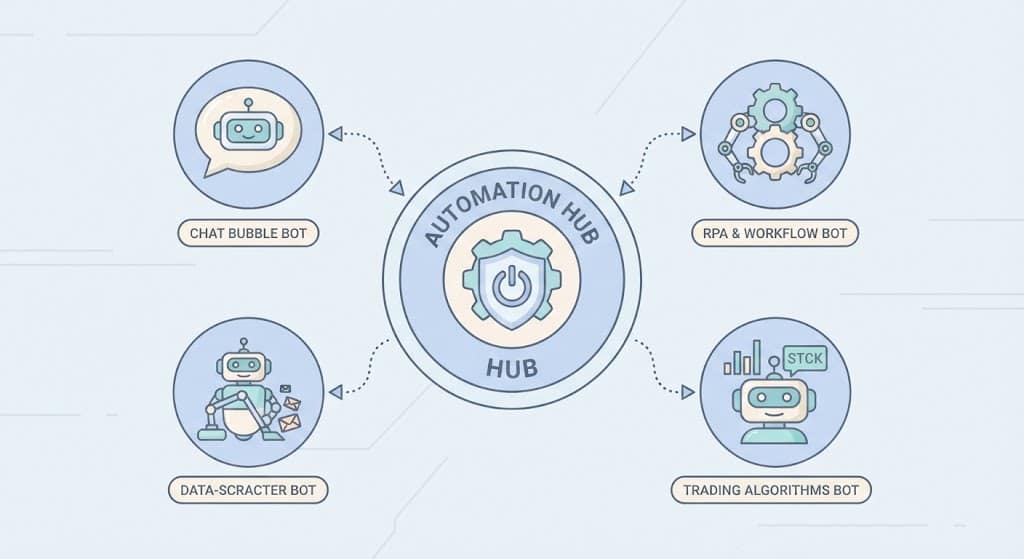
Not all automation bots are built the same way, and picking the wrong category for your task is one of the most common reasons automation projects stall. Here’s a breakdown of the main types in use today:
| Bot Type | What It Does | Typical Use Case | Example Platforms |
|---|---|---|---|
| Task/Workflow bots | Connect apps and move data between them via triggers and actions | Syncing a new lead from a web form into a CRM and Slack | Zapier, Make, Power Automate |
| RPA bots | Mimic human clicks and keystrokes inside existing software interfaces | Copying data from a legacy desktop app into a modern system | UiPath, Automation Anywhere, Blue Prism |
| Chatbots | Handle conversational interactions with users via text or voice | Answering FAQs, qualifying leads, booking appointments | Intercom, Drift, custom LLM-based bots |
| Web scraping/crawler bots | Extract structured data from websites automatically | Price monitoring, lead generation, research | Octoparse, Scrapy, custom scripts |
| Social media bots | Schedule, post, or respond to content on social platforms | Content scheduling, auto-replies, engagement tracking | Buffer, Hootsuite automation rules |
| AI agents | Use large language models to reason, plan multi-step tasks, and adapt to new situations | Research assistants, autonomous customer support, code review | Custom LLM agents, agentic frameworks |
| Trading/finance bots | Execute buy/sell orders or financial actions based on set rules | Algorithmic trading, automated bill payments | Broker APIs, custom scripts |
Automation Bots vs RPA vs AI Agents: What’s the Difference?
These three terms get used interchangeably, but they aren’t the same thing, and understanding the distinction will help you pick the right tool.
- Automation bots is the umbrella term. It covers any software built to carry out a task automatically, regardless of complexity.
- RPA (Robotic Process Automation) is a specific category of automation bot that interacts with software the way a human would — clicking, typing, reading screens — often used when there’s no API available. According to the widely cited overview on Wikipedia’s page on robotic process automation, RPA tools mimic the actions of a human interacting with digital systems to execute a business process</cite>, which is why RPA is especially common in banking, insurance, and healthcare, where legacy software is still widespread.
- AI agents are a newer, more advanced category. Rather than following a fixed script, they use large language models to interpret instructions, make judgement calls, and adapt their approach across multiple steps — closer to a digital assistant than a scripted bot.
A simple way to think about it: a task bot follows a recipe, an RPA bot follows a recipe while operating a human-style interface, and an AI agent can write its own recipe on the fly based on the goal you give it.
Real-World Use Cases of Automation Bots
Automation bots aren’t just an IT department tool anymore — they’re used across nearly every business function.
Customer Service
- Auto-responding to common support queries before routing complex ones to a human agent
- Automatically categorising and tagging incoming tickets
- Sending order status updates without manual lookup
Sales & Marketing
- Automatically adding new leads to a CRM and assigning them to the right rep
- Scheduling and publishing social media content at optimal times
- Sending personalised follow-up emails based on user behaviour
Finance & Operations
- Reconciling invoices against purchase orders
- Flagging duplicate or suspicious transactions
- Automatically generating and distributing monthly reports
IT & Software Development
- Running automated test suites every time code is updated
- Monitoring server uptime and triggering alerts or restarts
- Automatically deploying approved code changes
E-commerce
- Updating stock levels across multiple sales channels in real time
- Monitoring competitor pricing and adjusting listings
- Sending abandoned cart reminders

Benefits of Using Automation Bots
The appeal of automation bots comes down to a handful of consistent, measurable advantages:
- Time savings — Repetitive tasks that take a person hours can often be completed by a bot in minutes.
- Reduced human error — Bots don’t get tired, distracted, or make typos when following a defined process.
- 24/7 availability — Unlike staff, bots can run overnight, on weekends, and across time zones without extra cost.
- Scalability — A bot handling 50 transactions a day can usually handle 5,000 with little to no additional setup.
- Cost efficiency — Freeing employees from repetitive tasks lets them focus on higher-value, judgement-based work.
- Consistency and compliance — Bots follow the same steps every time, which is valuable in regulated industries where auditability matters.
- Faster response times — Customers and internal teams get quicker turnaround on requests that would otherwise sit in a queue.
Risks, Limitations, and Ethical Considerations
Automation bots aren’t a free win, and it’s worth going in with clear eyes about the trade-offs.
Common Risks
- Brittle automations — Bots built around a specific website layout or interface can break the moment that interface changes.
- Poor exception handling — A bot that doesn’t know how to flag unusual cases can silently make mistakes at scale, which is worse than a human making the same mistake once.
- Security exposure — Bots often need credentials or API access to systems; poorly secured bots can become an attack vector.
- Over-automation — Automating a broken process just makes the business produce bad outcomes faster.
- Bias in AI-driven bots — Bots that use machine learning can inherit biases present in their training data, particularly in areas like hiring, lending, or customer scoring.
Ethical and Regulatory Considerations
Bots that interact with customers should generally be disclosed as automated, particularly in regions with consumer protection rules around AI transparency. Bots that scrape websites should respect a site’s terms of service and robots.txt file — a standard, as documented in the general overview of internet bots on Wikipedia, which explains that bots typically operate autonomously and perform tasks that are simple and repetitive much faster than a person could</cite>, though that speed and scale is exactly why unregulated scraping bots can create legal and ethical problems if left unchecked.
Before deploying any bot that touches customer data, it’s worth reviewing relevant data protection obligations (such as GDPR in the UK and EU) to confirm the automation doesn’t process personal data in ways your privacy policy doesn’t cover.
How to Choose the Right Automation Bot for Your Business
Picking a bot platform shouldn’t start with the tool — it should start with the process. Work through this checklist before you commit to a platform:
- Map the process first. Write down every step of the task exactly as a human currently does it, including edge cases and exceptions.
- Check for an API. If the systems involved have an API, a simpler workflow-automation tool will usually be faster and cheaper to build than a full RPA bot.
- Estimate volume and frequency. A task done twice a week rarely justifies a complex bot; a task done hundreds of times a day almost always does.
- Decide how much judgement the task needs. Purely rule-based tasks suit traditional bots; tasks needing interpretation or flexible reasoning suit AI-agent-style tools.
- Consider maintenance, not just setup. Ask who will fix the bot when an app updates its layout or an API changes its structure.
- Test with a small, contained pilot. Automate one process end-to-end before rolling bots out across a whole department.
- Plan for exceptions from day one. Decide in advance what the bot should do — and who it should notify — when it hits something it can’t handle.
Automation Bot Platforms by Skill Level
| Skill Level | Recommended Approach | Examples |
|---|---|---|
| No-code | Drag-and-drop workflow builders | Zapier, Make, IFTTT |
| Low-code | Visual builders with some scripting | Power Automate, n8n |
| Enterprise/IT-led | Dedicated RPA suites with governance tools | UiPath, Automation Anywhere |
| Developer-led | Custom scripts and APIs | Python with requests/Selenium, custom LLM agents |
Getting Started: A Practical Implementation Path
If you’re building your first automation bot, resist the urge to automate everything at once. A steady, tested rollout beats a rushed one every time.
- Step 1: Pick one high-friction, low-risk task. Something repetitive, well-defined, and not mission-critical if it goes briefly wrong — like tagging new email leads.
- Step 2: Document the exact steps. Screenshot or write out every click, field, and decision point a human currently makes.
- Step 3: Choose the simplest tool that fits. Don’t reach for enterprise RPA if a no-code workflow tool covers 90% of the need.
- Step 4: Build and test in a sandbox. Run the bot against real (or realistic) data before letting it touch live systems.
- Step 5: Add monitoring and alerts. Make sure someone is notified if the bot fails or produces unexpected output.
- Step 6: Review results after two to four weeks. Check accuracy, time saved, and any recurring errors before expanding the bot’s scope.
- Step 7: Scale gradually. Once one bot is stable, use the same framework to tackle the next repetitive process.
The Future of Automation Bots
Automation bots are moving quickly from rigid, script-based tools toward more adaptive, reasoning-capable systems. A few trends worth watching:
- Agentic AI — Bots that can plan multi-step tasks, use external tools, and adjust their approach mid-task rather than following a fixed script.
- Natural language bot building — Platforms increasingly let non-technical users describe an automation in plain English and have the bot configuration generated automatically.
- Tighter integration between RPA and AI — Traditional RPA vendors are adding AI-based document understanding and decision-making to reduce the need for rigid, rule-by-rule setup.
- Greater emphasis on governance — As bots take on more sensitive tasks, expect more built-in audit trails, permission controls, and human-in-the-loop checkpoints.
The direction is clear: automation bots are becoming less about rigid scripts and more about flexible digital coworkers that can be trusted with judgement, not just repetition.
Final Thoughts
Automation bots have moved well beyond a niche IT concept — they’re now a practical, accessible way for teams of any size to reclaim time spent on repetitive digital work. The key isn’t picking the flashiest tool; it’s matching the right type of bot to the right process, starting small, and building in proper monitoring and exception handling from the outset. Get that foundation right, and automation bots can become one of the highest-return investments a modern business makes.