Most teams lose hours every week to tasks that feel productive but aren’t drafting routine emails from scratch, hunting through long meeting recordings, reformatting data manually, or sitting through agenda-free calls. These aren’t skill gaps; they are workflow gaps. And if you are still managing Google Workspace the same way you did in 2023, you are leaving a genuinely powerful productivity engine running at idle. Google Workspace artificial intelligence powered by Gemini and woven into every corner of Gmail, Docs, Sheets, Slides, Meet, Drive, and more is now capable enough to close those gaps. This guide walks through 15 of the most impactful AI features currently live in Google Workspace, explains what each one actually does, and shows why it matters for the way real teams work in 2026.
What Is Google Workspace Artificial Intelligence?
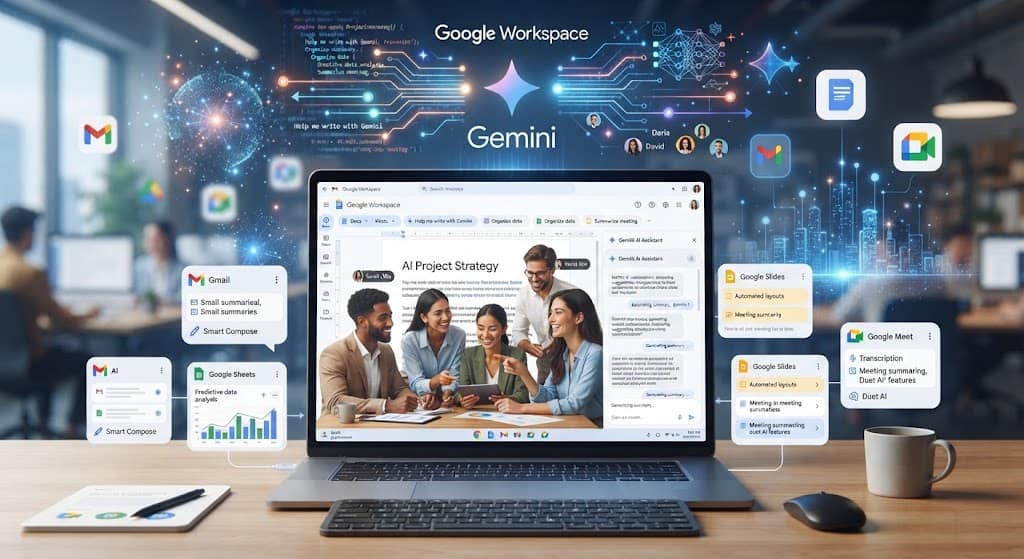
Google Workspace artificial intelligence refers to the suite of machine-learning and generative-AI capabilities built directly into Google’s productivity platform. At its core is Gemini, Google’s flagship large language model, which replaced earlier AI add-ons in January 2025 when Google embedded AI into every Business and Enterprise Workspace plan at no separate add-on cost. That pricing shift was significant: the same Gemini AI that previously cost an additional $18 per user per month became bundled into plans starting at roughly $14 per user per month. Today, Gemini is embedded in Gmail, Docs, Sheets, Slides, Drive, Meet, Chat, and a new video app called Google Vids — every app, every workflow, already there.
The underlying technology stack combines transformer-based language models, multimodal understanding (text, images, and audio), and deep integration with a user’s own organizational data — all governed by Google’s enterprise privacy commitments. Your data stays within your organization, is never used to train Google’s models, and existing Workspace data protections apply automatically.
“AI isn’t just an add-on — it’s central to how work gets done. Gemini is now embedded in every major Workspace app, from Gmail to Meet.”
The 15 Google Workspace AI Features Worth Knowing
As businesses and teams look for smarter ways to collaborate, Google Workspace Artificial Intelligence has emerged as a transformative suite of tools designed to streamline daily tasks, boost productivity, and automate complex workflows. Whether you are drafting emails, managing data, or building applications, leveraging Google Workspace AI changes how modern teams operate. Below is a comprehensive look at the top features available.
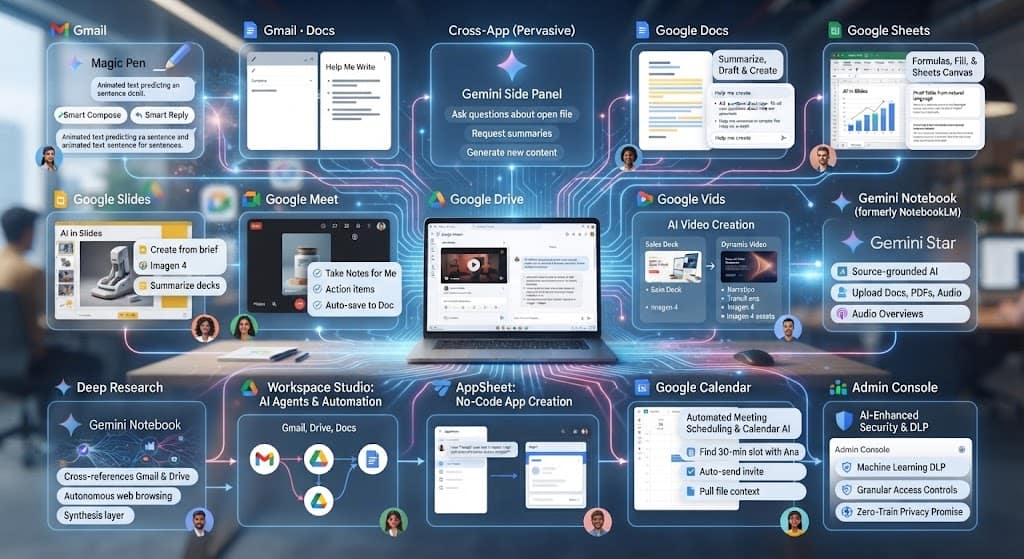
Feature 01: Gmail — Smart Compose & Smart Reply
Smart Compose uses predictive AI to suggest sentence completions as you type an email — pressing Tab accepts the suggestion and keeps you moving.
Smart Reply goes a step further, offering short contextual reply options at the bottom of any email thread so you can respond in one tap. Together, these core elements of Google Workspace AI cut email composition time significantly for repetitive or routine correspondence. They learn your writing patterns over time, making suggestions progressively more relevant to your individual style. You can explore more through the official Gmail AI Features page.
Feature 02: Gmail & Docs — Help Me Write
Where Smart Compose nudges, Help Me Write drafts entire documents from a prompt. In Gmail, clicking the pen icon in the compose window lets you describe what you need — “Write a follow-up to our Q3 product demo, friendly tone, two paragraphs” — and Gemini generates a ready-to-edit draft in seconds.
In Google Docs AI Integration, the same capability turns a bulleted outline or a one-line brief into a fully formatted first draft. The output is editable and privacy-contained: nothing leaves your Workspace tenant. (If you want to see how this compares to communication tools, check out our section on Gmail features above).
Feature 03: Cross-App — Gemini Side Panel
Perhaps the most pervasive Google Workspace AI feature is the Gemini side panel, accessible from every major app via a consistent icon in the toolbar.
From this panel you can ask questions about the file you have open, request summaries, generate new content, or pull context from your broader Drive and Gmail — all without switching tabs. In Gmail, you can ask “What did the team decide about the product launch last week?” and Gemini will surface relevant threads. In Docs, you can ask it to rewrite a section in a more formal tone while you keep editing the rest of the page.
Feature 04: Google Docs — Summarize, Draft & Create
Gemini’s best Docs capabilities go well beyond basic drafting. Automatic summarization condenses long reports into key bullet points on demand — a practical time-saver when reviewing research or briefing a colleague.
A new “Help me create” tool generates fully styled documents — complete with headers, tables, and formatting — from a structured prompt. An “AI Overview” feature lets you ask Gemini a question, like retrieving a specific detail from an old file, and it searches across your Docs library to find the answer without you manually digging through folders.
Feature 05: Google Sheets — Formulas, Fill, & Sheets Canvas
Gemini has transformed what is possible inside a spreadsheet without writing a single formula manually. With a plain-English prompt, Gemini can generate complex formulas, build pivot tables, and produce charts from natural language descriptions like “show me monthly revenue by region as a bar chart.”
A “Fill with Gemini” feature speeds up populating tables from raw or incomplete data. The most ambitious addition is Google Sheets AI & Canvas — a new capability that lets Gemini turn a spreadsheet into a dynamic mini-app or interactive dashboard, dramatically expanding what non-developers can build.
Feature 06: Google Slides — AI Decks & Imagen 4
Creating a slide deck from scratch is now a prompt away. In Google Slides & Imagen 4, Gemini can generate a full, editable deck from a brief — specifying topic, audience, and structure — producing native Slides output rather than a text export.
A major upgrade arrived with the integration of Imagen 4, Google’s latest image-generation model, which lets you create custom, high-quality visuals directly inside Slides without leaving the app. Imagen 4 delivers notably improved spelling accuracy and text rendering in generated images, which matters for product mockups, marketing slides, and infographics. Gemini can also summarize existing decks into speaker briefs, reducing prep time before a presentation.
Feature 08: Google Drive — AI Video Summaries
Google Drive now lets users ask questions about video files stored in the cloud. Double-clicking a video reveals an AI interface where you can type prompts like “Summarize this video” or “List the action items from this meeting recording.”
The model processes the audio and content to generate structured answers without you having to watch the full recording. Learn more directly via Google Drive AI Video Summaries. This feature requires smart features and personalisation to be enabled by an admin, and it works across uploaded video files as well as meeting recordings saved automatically from Meet.
Feature 09: Google Vids — AI Video Creation
Google Vids is a new addition to the Workspace suite built specifically for AI-assisted video creation. It lets users transform existing assets — a sales deck, a quarterly business review presentation, or a document — into dynamic, shareable videos with narration, transitions, and structured visual storytelling.
Vids now runs on Google AI Pro and Ultra plans and integrates with Imagen 4 for generating rich in-video visuals. For teams that create training content, client communications, or product demos, Vids replaces a workflow that previously required specialist tools and dedicated time.
Feature 10: Gemini Notebook (Formerly NotebookLM)
As of July 2026, NotebookLM is now officially Gemini Notebook (NotebookLM), reflecting its deeper integration into the Workspace ecosystem. It remains a source-grounded AI research assistant — meaning it answers questions based only on documents you upload, reducing hallucination risk.
You can feed it Google Docs, PDFs, Slides, Sheets, YouTube links, and audio files (up to 500,000 words per source), then interrogate the material through chat. Its signature Audio Overviews feature turns uploaded documents into podcast-style conversations between two AI hosts — a proven format for absorbing dense material quickly. A legal firm recently used Audio Overviews to process a 400-page compliance manual into a format lawyers could listen to on the go.
Feature 11: Deep Research
Deep Research is a purpose-built AI research agent available inside Gemini Notebook and the main Gemini interface. You provide a research question; Gemini creates a plan, browses hundreds of websites autonomously, refines its search as it learns, and delivers a source-grounded, organized report in minutes.
What differentiates it from a basic web search is the synthesis layer: it does not just find pages, it reads, cross-references, and compiles them. A notable 2026 enhancement allows Deep Research to draw on context from your Gmail, Drive, and Chat alongside its web browsing — letting it combine internal company knowledge with external research in a single report. You can review the specifics in the Google Deep Research Documentation.
Feature 12: Workspace Studio — AI Agents & Automation
Google Workspace Studio, launched in late 2025, is the platform’s most significant shift toward autonomous AI. Unlike earlier automation tools built on rigid “if-then” logic, Studio lets you deploy AI agents that reason through goals and execute multi-step workflows end to end — across Gmail, Drive, Docs, Sheets, Calendar, and Chat natively.
Pre-built zero-configuration templates cover common use cases like meeting briefings, lead sorting, and automated follow-ups. For complex enterprise needs, agents can connect to Salesforce, Jira, Asana, and other third-party platforms. A May 2026 update integrated Gemini Notebook into Studio flows, letting agents query your organization’s internal knowledge bases automatically as part of any workflow.
Feature 13: AppSheet — No-Code App Creation
AppSheet No-Code App Creation, Google’s no-code application platform included with Workspace Enterprise, now uses Gemini to let users build apps by describing a business process in plain language rather than configuring tables and rules manually.
Gemini for App Creation handles the schema and logic; you describe the problem. In AppSheet Solutions, Gemini AI tasks can be added to automations to extract structured data and categories from images and documents — making it practical for receipt processing, inventory photo tagging, or document classification workflows without writing a single line of code.
Feature 14: Google Calendar & Gmail — Automated Meeting Scheduling
Google Calendar & Workspace Intelligence automates the friction-heavy parts of meeting management. When scheduling or editing an event, you can enable AI to automatically track action items and key decisions and compile meeting notes.
Workspace Intelligence in Gmail and Chat now operates as a “command center” for scheduling — users can ask Gemini via the Chat interface to “find a 30-minute slot with Ana this week” and it surfaces availability, sends an invite, and can even pull relevant context (like a shared project file) into the invite automatically. This cross-app scheduling intelligence is a practical daily time-saver for anyone managing a full calendar.
Feature 15: Admin Console — AI-Enhanced Security & DLP
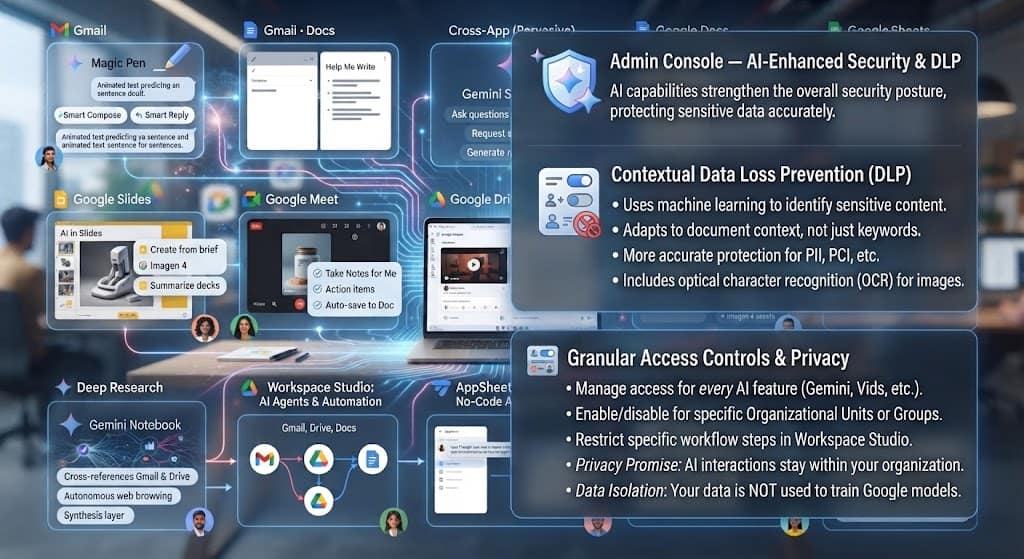
Artificial intelligence capabilities within Google Workspace AI are not limited to productivity features — they also strengthen the platform’s overall security posture. AI-enhanced Data Loss Prevention (DLP) uses machine learning to identify and protect sensitive content more accurately than static keyword rules, adapting to the context of a document rather than pattern-matching alone.
Admins can manage granular access controls for every AI feature — from enabling or disabling the Gemini app, Gemini Notebook, or Take Notes for Me, to restricting specific Workspace Studio steps at the organizational unit or group level via the Google Workspace Admin Console. All AI interactions stay within the organization; Google does not use Workspace content to train its models, and no AI feature changes the foundational data protections that have governed the platform since its launch. (For more details on data security commitments, check out the resources below).
Conclusion
Google Workspace artificial intelligence has moved well past the novelty stage. What began as experimental autocomplete has matured into a comprehensive AI layer that drafts, summarizes, analyzes, builds, automates, and even represents you in multi-step workflows — all inside the applications your team already uses every day.
The 15 features covered here span the full breadth of that capability: from the everyday utility of Smart Compose and Help Me Write, through the analytical power of Deep Research and Gemini Notebook, to the agentic ambition of Google Workspace Studio. Taken together, they represent a genuine shift in how work gets done — less time on mechanics, more time on thinking.
The practical starting point is straightforward: if you are on a Business Standard plan or above, most of these features are already available to you at no additional cost. Enable the Gemini side panel in Docs or Gmail, run one meeting with Take Notes for Me active, and try a single Workspace Studio template for an email workflow you repeat weekly. The compounding effect of small time savings across a whole team is where the real value emerges — and that value is available right now, no