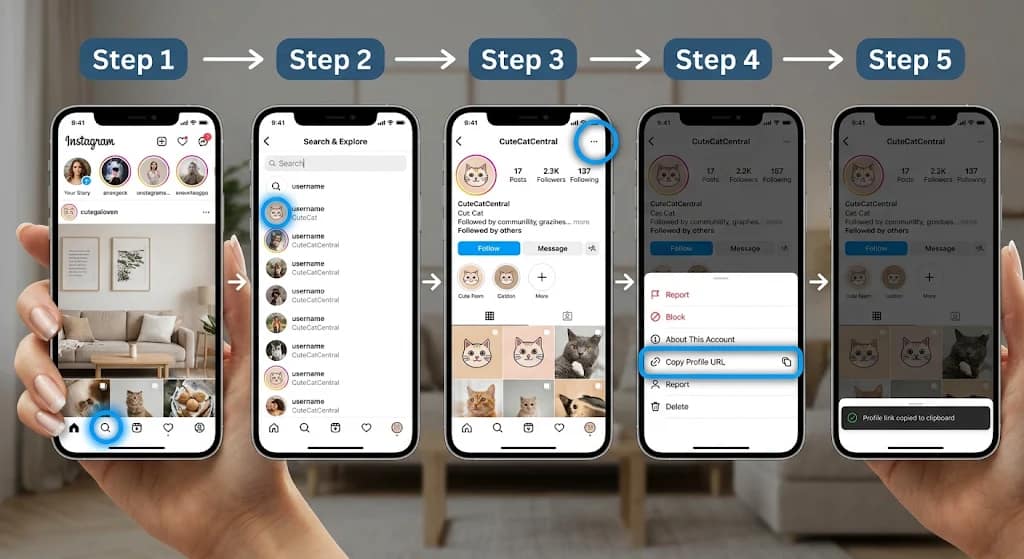
Learn how to copy Instagram profile link on iPhone, Android and PC. Follow 7 easy methods to share your profile, copy URLs and fix common problems.
How to Copy Instagram Profile Link: Complete 2026 Guide
If you want to share your Instagram account with friends, customers, colleagues, or followers, knowing how to copy instagram profile link can save time and make sharing much easier. Instead of asking someone to search for your username manually, you can send them a direct link that opens your Instagram profile.
Instagram provides built-in sharing options for copying your profile URL on mobile devices. You can also obtain your profile address through a desktop browser or create the standard URL using your Instagram username.
Whether you use an iPhone, Android smartphone, Windows PC, or Mac, this guide explains seven practical methods to find, copy, and share your Instagram profile link in 2026.
You will also learn how to copy someone else’s profile link, share your Instagram QR code, troubleshoot broken links, and understand how private account settings affect profile visibility.
1. What Is an Instagram Profile Link?
An Instagram profile link is a unique web address that directs people to an Instagram account.
Every Instagram profile has a URL based on its username. The general format looks like this:
For example, if an account uses the username tech_example, its profile address would follow this format:
The word username is replaced with the account’s actual Instagram handle.
An Instagram profile URL allows people to visit an account without manually searching for its name.
Why is an Instagram profile link useful?
- Easy sharing: Send your account through WhatsApp, Messenger, email, or text messages.
- Business promotion: Add your Instagram profile to your website, business card, or marketing material.
- Creator networking: Share your account with brands, collaborators, and potential followers.
- Website integration: Place your Instagram URL on your blog or portfolio.
- Convenience: Help people reach the correct account without searching through similar usernames.
It is important to understand that a profile link is different from a post or Reel link. A profile URL opens the account, while a post URL directs someone to a particular piece of content.
2. How to Copy Instagram Profile Link on Android
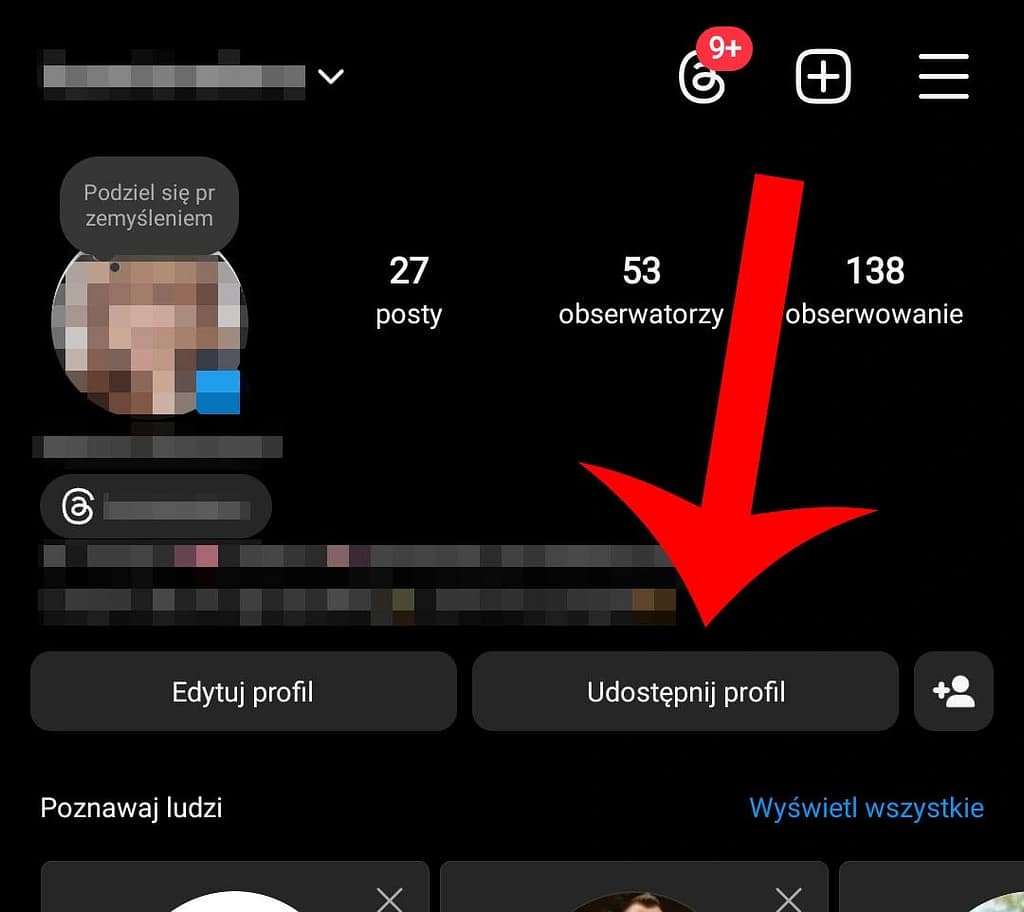
Android users can copy their Instagram profile URL directly from the official application.
The easiest method is to use Instagram’s Share Profile feature.
Step-by-step instructions
- Open the Instagram application on your Android smartphone.
- Log in to your account if necessary.
- Tap your profile picture in the bottom-right corner.
- Your Instagram profile page will appear.
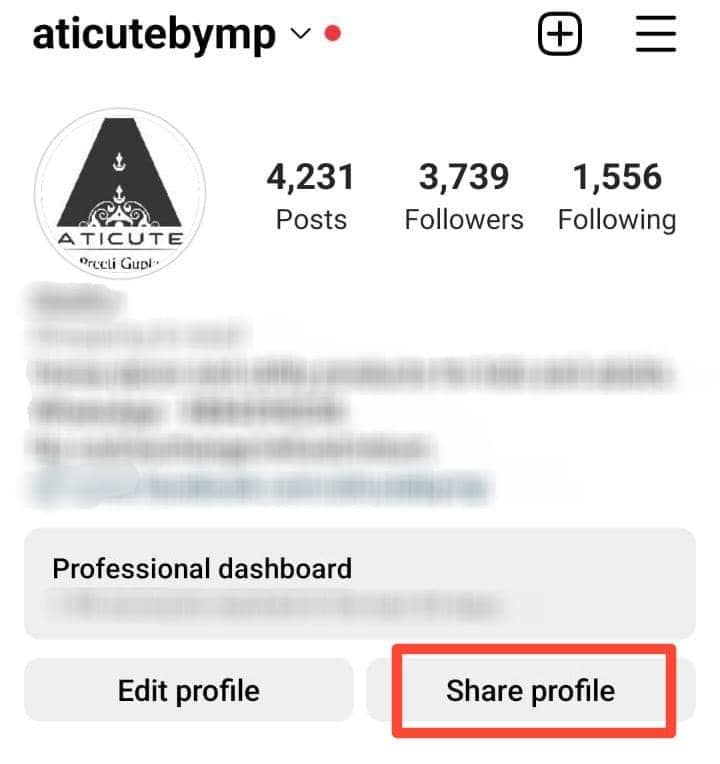
- Look for the Share profile option beneath your profile information.
- Tap Share profile to open the profile-sharing screen.
- Select Copy link.
- Open WhatsApp, Messenger, Gmail, or another application.
- Touch and hold the message field.
- Select Paste to insert your copied Instagram URL.
Your profile link is now ready to share.
What if the Copy Link option is missing?
Instagram sometimes changes its interface or makes features available gradually.
If you cannot find the Copy link option:
- Check whether Instagram has an available application update.
- Look for the Share profile button on your profile.
- Check the sharing screen for another copy option.
- Use the desktop browser method explained below.
- Create your profile URL manually using your exact username.
You do not need a third-party application to obtain a normal Instagram profile link.
3. How to Copy Instagram Profile Link on iPhone

The process on an iPhone is very similar to Android. Instagram provides a profile-sharing feature that lets users copy their account URL.
Follow these steps
- Open Instagram on your iPhone.
- Tap your profile picture in the bottom-right corner.
- Open your personal profile.
- Tap Share profile beneath your profile information.
- Wait for your Instagram profile card to appear.
- Find the Copy link option.
- Tap it to copy the URL.
- Open Messages, WhatsApp, Notes, or another application.
- Press and hold the text field.
- Tap Paste.
The copied address can now be shared with anyone.
Can you share your Instagram profile through the iPhone share menu?
Yes. Instead of copying the link and pasting it manually, you can use the sharing options available on the profile card.
Depending on your app version, you may see options to share your profile through compatible applications.
This is useful when you want to send your Instagram profile directly to someone.
Note: Instagram’s profile-card feature is not necessarily available to every account. If your screen looks different, use the browser method as an alternative. TrackMedia+1
4. How to Copy Instagram Profile Link on PC or Laptop
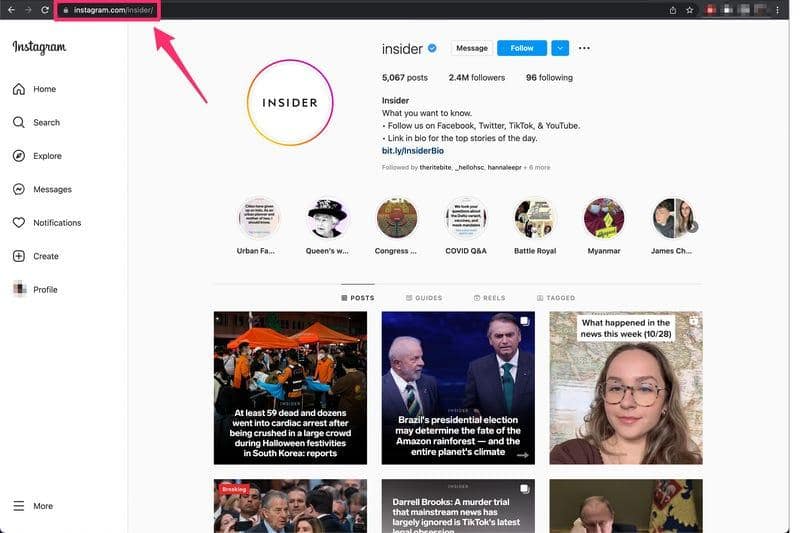
If you use Instagram on a computer, you can obtain your profile link without opening the mobile application.
This method works on Windows PCs, MacBooks, and most modern web browsers.
Method 1: Copy the URL from your browser
- Open Google Chrome, Microsoft Edge, Firefox, or Safari.
- Visit Instagram.com.
- Log in to your Instagram account.
- Open your profile from the navigation menu.
- Look at the browser’s address bar.
- Your Instagram profile URL should appear there.
- Select the complete address.
- Press
Ctrl + Con Windows orCommand + Con Mac. - Open your preferred messaging application.
- Press
Ctrl + VorCommand + Vto paste the link.
Your profile address is now copied.
Method 2: Use your profile username
You can also create the standard profile URL manually.
For example:
- Instagram username:
digital_creator - Profile URL:
https://www.instagram.com/digital_creator/
Simply replace the example username with your actual Instagram username.
This is a convenient alternative if the mobile application does not display the Share profile option.
5. How to Copy Someone Else’s Instagram Profile Link
Sometimes you may want to share another person’s Instagram account rather than your own.
For example, you might want to send a friend’s profile to someone, recommend a content creator, or share a business account with a customer.
Instagram allows users to share accessible profiles using its built-in sharing options.
Steps to copy another person’s Instagram link
- Open Instagram on your smartphone.
- Tap the Search icon.
- Enter the person’s Instagram username.
- Open the correct profile.
- Check the profile picture and username to confirm it is the intended account.
- Tap the three-dot menu or the available sharing option.
- Select Share profile if available.
- Choose Copy link from the sharing screen.
- Open WhatsApp or another application.
- Paste and send the copied URL.
The exact menu wording may differ between Instagram versions and devices.
How to copy someone else’s profile link on a computer
The desktop method is even simpler.
- Open Instagram in your browser.
- Search for the account.
- Open the correct profile.
- Click the browser’s address bar.
- Select the complete URL.
- Press Ctrl + C on Windows or Command + C on Mac.
- Paste it wherever you want to share it.
Always check the username before sharing. Many Instagram accounts have similar display names, and sending the wrong profile link can confuse the recipient.
6. How to Create an Instagram Profile Link Without Using the App
Did you know you can create a standard Instagram profile URL without opening Instagram’s mobile application?
You only need the account’s exact username.
The standard URL format is:
Replace USERNAME with the correct Instagram handle.
Example
Suppose your Instagram username is techcommand2026.
Your profile link would be:
You can type this address into a browser or paste it into a message.
Important username rules
When creating your profile URL manually, remember these points:
- Use your Instagram username, not your display name.
- Do not include the @ symbol after the domain.
- Preserve dots and underscores.
- Do not insert spaces.
- Check the spelling before sharing.
- Use the correct Instagram domain.
For example, tech.command and tech_command represent different usernames.
A small spelling mistake can direct someone to the wrong account or an unavailable page.
This manual approach is particularly useful for business owners, bloggers, digital marketers, and people who regularly share their social media profiles.
7. How to Share Your Instagram Profile Using a QR Code

Instagram also offers profile cards and QR codes that make account sharing easier.
A QR code is a scannable image that directs someone to your Instagram profile.
Instead of typing a username or copying a long URL, another person can scan your code using a compatible camera or QR scanning feature.
How to find your Instagram QR code
- Open the Instagram application.
- Navigate to your profile.
- Tap Share profile.
- Open the profile card.
- Find the QR code displayed on the card.
- Use the available download or sharing option.
The available customization and download options can vary depending on the application version and account interface.
Where can you use your Instagram QR code?
Instagram QR codes can be useful in several situations:
- Business cards.
- Shop counters.
- Restaurant menus.
- Marketing flyers.
- Event invitations.
- Product packaging.
- Presentations.
- Digital portfolios.
For example, a small business can place its Instagram QR code on a printed business card. Customers can scan the code to reach the business profile without searching manually.
However, always test the QR code before printing it on permanent marketing materials.
8. How to Share Your Instagram Profile Link on WhatsApp, Facebook and Email
After copying your profile URL, you can share it through many communication platforms.
The process is straightforward because most applications support clickable web links.
Share an Instagram profile link on WhatsApp
- Copy your Instagram profile URL.
- Open WhatsApp.
- Select an individual chat or group.
- Tap the message box.
- Paste your Instagram link.
- Send the message.
The recipient can tap the URL to open your profile.
Share your Instagram link on Facebook
- Copy your profile URL.
- Open Facebook.
- Navigate to the post, comment, or message where you want to share it.
- Paste the URL.
- Publish or send it.
You can also include your Instagram link in suitable profile or business information fields.
Share your Instagram profile through email
Email is useful for professional communication.
For example, if you are applying for a social media marketing position, you can include your Instagram profile URL in your email signature or portfolio.
You can also share your account with potential clients, collaborators, and business partners.
Add your Instagram profile link to a website
Website owners and bloggers can use their Instagram profile URLs to connect their websites with their social media accounts.
A clickable link can help visitors find the associated Instagram account.
If you are learning other ways to improve your online research and digital skills, explore TechCommand’s guide to 10 Internet Search Tips for Better Google Results.
9. Instagram Profile Link vs Post Link vs Reel Link
Many users confuse an Instagram profile URL with links to individual posts and Reels.
Although all three use the Instagram domain, they direct visitors to different destinations.
| Link type | Purpose | Typical URL structure |
|---|---|---|
| Profile link | Opens an Instagram account | instagram.com/username |
| Post link | Opens a specific post | instagram.com/p/shortcode |
| Reel link | Opens a specific Reel | instagram.com/reel/shortcode |
| QR code | Directs a scanner to a profile | Encoded Instagram URL |
How to copy an Instagram post link
- Open the Instagram post.
- Tap the Send or sharing icon.
- Select Copy link.
- Paste the URL into your preferred application.
On a computer, open the post and use its Options menu to find the copy-link action.
How to copy an Instagram Reel link
- Open the Reel you want to share.
- Tap the Send icon.
- Select Copy link.
- Paste the link into a message or document.
Remember that a profile link directs visitors to an account, whereas a post or Reel link directs them to a particular piece of content.
Instagram also applies privacy restrictions to shared content. Copying a private account’s post URL does not make that post publicly accessible. TrackMedia+1
10. Common Problems When Copying an Instagram Profile Link
Sometimes users copy a profile link but discover that it does not open correctly.
The problem may involve an incorrect username, an outdated URL, a changed account name, or the recipient’s access permissions.
Here are some common issues and their solutions.
Problem 1: The profile link does not open
Possible reason: The URL contains an incorrect username or typing mistake.
Solution: Check every character, especially dots and underscores. Open the corrected address in your browser.
Problem 2: The Copy link option is missing
Possible reason: Instagram’s interface may differ between accounts or application versions.
Solution: Look for Share profile, update the application if needed, or use the browser address-bar method.
Problem 3: Instagram displays an unavailable page
Possible reason: The account may have changed its username, been disabled, or become unavailable.
Solution: Confirm the current username and request an updated link from the account owner.
Problem 4: The recipient cannot see the profile’s posts
Possible reason: The Instagram account is private.
Solution: The recipient must have an approved follower relationship to access private posts. Sharing the URL does not bypass Instagram’s privacy settings.
Problem 5: The copied link opens Instagram but asks the user to log in
Possible reason: Instagram may request authentication when someone opens a profile through a browser.
Solution: The recipient can try opening the URL in the Instagram application and logging in to their own account.
Problem 6: The profile URL is outdated
Possible reason: You changed your Instagram username after sharing the old address.
Solution: Copy or construct the link again using your current username. Update it wherever you previously published the old URL.
For additional account safety guidance, consult the eSafety Commissioner’s Instagram safety guide.
11. Frequently Asked Questions (FAQs)
1. How to copy Instagram profile link on a mobile phone?
Open Instagram, navigate to your profile, tap Share profile, and select Copy link. You can then paste the copied URL into WhatsApp, Messenger, email, or another application.
2. How do I find my Instagram profile URL?
Open your Instagram profile and use the Share profile option to copy its link. Alternatively, open your account in a web browser and copy the address from the browser’s address bar.
3. Can I copy my Instagram profile link without the app?
Yes. You can create your standard Instagram profile URL manually by adding your exact username after https://www.instagram.com/. You can also copy the address directly from Instagram’s website.
4. How to copy Instagram profile link on Android?
Open the Instagram application, tap your profile picture, select Share profile, and tap Copy link. The copied URL can then be pasted into any application that supports links.
5. How to copy Instagram profile link on iPhone?
Open Instagram on your iPhone, visit your profile, tap Share profile, and choose Copy link. Open your preferred messaging application and paste the URL.
6. Can I copy someone else’s Instagram profile link?
Yes. Open the person’s Instagram profile and look for the sharing option or three-dot menu. Select the available Copy link option. You can also copy their profile URL directly from a web browser.
7. Does copying an Instagram profile link make a private account public?
No. Copying or sharing a profile link does not change account privacy settings. If an account is private, only approved followers can access its private posts and other restricted content.
8. Does my Instagram profile link change when I change my username?
Yes. Your profile URL is based on your username. When you change your username, your profile address changes too. Update previously shared links on your website, business cards, email signatures, and other platforms.
Conclusion
Learning how to copy instagram profile link is a simple but useful skill for anyone who wants to share an Instagram account quickly.
Whether you use Android, iPhone, or a desktop computer, Instagram offers convenient ways to obtain your profile URL. You can use the Share profile feature, copy the address from your browser, or create the standard URL using your username.
You can also share your profile through WhatsApp, Facebook, email, websites, and QR codes.
Always verify the copied URL before sharing it, especially if you have recently changed your username. Remember that copying a profile link does not bypass private account restrictions.
Follow the methods in this guide to make Instagram profile sharing easier in 2026.