Most businesses lose customers not because their product is weak, but because nobody answers fast enough — a support ticket sits for six hours, a lead fills out a form at 11 p.m. and never hears back, and by morning they’ve already bought from a competitor. The fix that’s now standard across every serious industry, from SaaS to healthcare to e-commerce, is the AI chatbot: a software program that uses natural language processing (NLP) and machine learning to understand what a person is asking and respond instantly, accurately, and at any hour, without waiting on a human agent to log in. This guide breaks down exactly what an AI chatbot is, how it actually works under the hood, which tools are worth using in 2026, and where chatbots deliver real business value — not hype.
What Is an AI Chatbot?

An AI chatbot is a computer program built to simulate human conversation through text or voice. Unlike the old-style chatbots that just matched keywords to pre-written scripts, a true AI chatbot uses natural language processing (NLP), natural language understanding (NLU), and machine learning to interpret intent, hold context across a conversation, and generate responses that feel human rather than robotic. Where a rule-based bot breaks the moment a user phrases something unexpectedly, an AI chatbot can handle typos, slang, and open-ended questions because it’s reasoning about meaning, not just matching text strings.
Modern AI chatbots also fall into a few distinct categories worth knowing:
- Rule-based chatbots — follow decision trees and pre-set scripts; reliable for narrow, predictable tasks but brittle outside them.
- NLP/AI-powered chatbots — use machine learning and NLP to understand varied phrasing and maintain context.
- Generative/LLM-based chatbots — built on large language models (like the ones powering ChatGPT, Claude, and Gemini) that generate original, context-aware responses rather than pulling from a fixed script library.
- Voice-enabled conversational AI — extend the same underlying NLP to spoken interactions through assistants and IVR systems.
How Do AI Chatbots Work?
Understanding the mechanics makes it much easier to pick the right tool later, so it’s worth walking through the pipeline step by step.

1. Input Processing and Tokenization
When a user types or speaks a message, the chatbot first breaks the input into smaller units called tokens — individual words or phrases — and filters out low-value “stop words” like “a,” “the,” or “and” so it can focus on the words that actually carry meaning.
2. Intent Recognition
The system then classifies what the user actually wants — their intent — using models trained on large volumes of prior conversations. This is the step that lets a chatbot recognize that “I want to cancel my order” and “can you stop my order” mean the same thing, even though the wording is completely different.
3. Entity Extraction
Alongside intent, the chatbot pulls out entities: the specific details that matter, such as an order number, a date, a location, or a product name. Intent tells the bot what the user wants; entities tell it the specifics it needs to act on that request.
4. Error Correction and Synonym Matching
Human language is messy. A well-built NLP chatbot uses autocorrection and synonym mapping so that a typo like “emali” is understood as “email,” and a word like “luggage” is matched to “baggage” even if that’s not the exact term in its training data. This flexibility is what separates a genuinely useful AI chatbot from a frustrating keyword-matcher.
5. Response Generation
Once intent and entities are understood, the chatbot generates a response — either by retrieving the best-matching answer from a knowledge base or, in the case of generative AI chatbots, by producing a new, original reply using a large language model. Machine learning continues to refine this process over time, so the bot gets more accurate the more it’s used.
6. Continuous Learning
Every conversation becomes training data. The chatbot’s underlying models are periodically retrained or fine-tuned on this real usage, which is why a well-maintained chatbot tends to improve steadily rather than staying static.
Benefits of Using an AI Chatbot
Businesses adopt AI chatbots because the return on investment is measurable, not theoretical.
- 24/7 availability — customers get instant answers at any hour, which matters enormously for global businesses and international users who aren’t operating on your support team’s time zone.
- Lower cost per resolution — by automating repetitive, low-complexity questions, chatbots let support teams scale without proportionally growing headcount.
- Faster response and resolution times — even when a query needs a human, the chatbot can collect context up front, reducing back-and-forth and shortening the overall resolution cycle.
- Reduced agent burnout — human agents stop repeating the same answers all day and can focus on complex or sensitive cases instead.
- Personalization at scale — modern chatbots can reference a customer’s history and preferences, so responses feel relevant rather than generic.
- Consistent omnichannel support — the same bot can maintain context across live chat, WhatsApp, email, and social messaging, so customers don’t have to repeat themselves when they switch channels.
- Higher lead capture and conversion — on marketing and sales pages, a chatbot can qualify a visitor and book a meeting the moment interest peaks, instead of losing them to a contact form nobody checks until the next business day.
Best AI Chatbot Tools in 2026
The right chatbot depends heavily on the job you need it to do. Based on current market testing and reviews, here’s how the major tools break down by strength:
- ChatGPT — the most well-rounded general-purpose chatbot, strong across writing, reasoning, coding, and research synthesis, with a familiar multimodal interface that requires no technical setup.
- Claude — widely regarded as the strongest option for long-form writing, content creation, and nuanced reasoning, with large context windows suited to processing lengthy documents.
- Gemini — deeply integrated into Google Workspace, making it a natural fit for teams already living in Docs, Sheets, and Gmail.
- Perplexity — built around sourced, citation-backed answers, making it the go-to choice when research accuracy and traceability matter most.
- Microsoft Copilot — tightly woven into Microsoft 365, ideal for enterprises standardized on Word, Excel, and Teams.
- Intercom Fin, Tidio, and ProProfs — purpose-built customer service bots that integrate directly with help desks, focused on ticket resolution rather than open-ended conversation.
- DeepSeek and other open-source options — attractive for budget-conscious or highly customized deployments where data control matters more than out-of-the-box polish.
When comparing tools, evaluate them the way analysts do: reasoning depth, response latency, integration flexibility, data governance (SSO/SCIM support, data retention policies, training opt-outs), and pricing scalability — not just headline features.
Real-World Use Cases of AI Chatbots
AI chatbots have moved well past novelty status and now operate as genuine members of the workflow in several areas:
- Customer support — resolving FAQs, tracking orders, and escalating complex tickets with full context already attached.
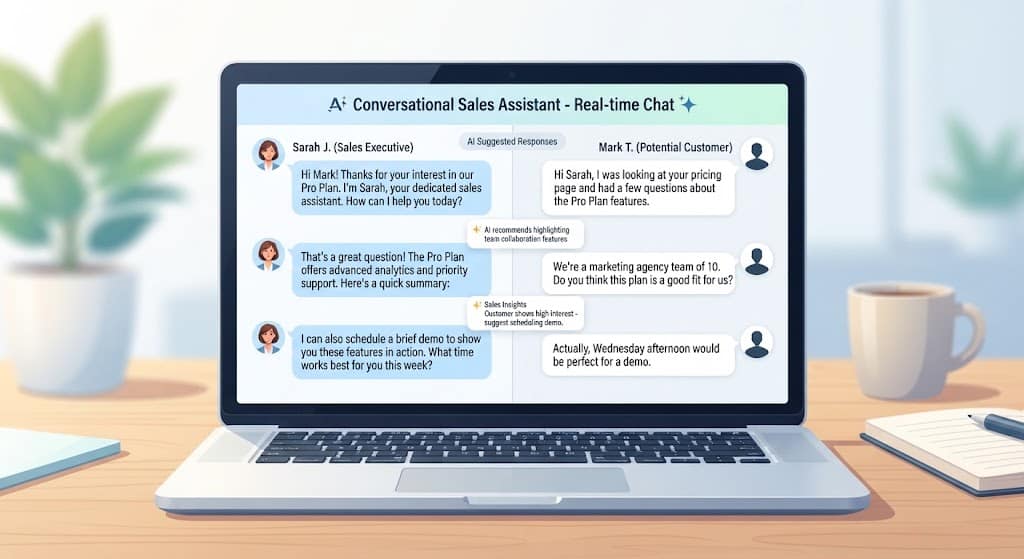
- Sales and lead qualification — engaging website visitors in real time, asking qualifying questions, and booking meetings automatically.
- E-commerce — guiding shoppers to the right product, answering sizing or shipping questions, and recovering abandoned carts.
- Healthcare — scheduling appointments, answering routine patient questions, and triaging symptoms before a human follow-up (always alongside, never replacing, clinical judgment).
- HR and internal operations — answering employee policy questions, handling onboarding tasks, and routing IT requests.
- Education — tutoring, answering course-related questions, and providing 24/7 study support.
- Content and research — drafting, summarizing, and structuring information for teams that need to move fast, a workflow techcommand.co.uk’s content services are built directly around.
How to Choose the Right AI Chatbot for Your Business
Start with the job, not the brand name. If you need a single assistant that writes, analyzes, and reasons across many topics, a general-purpose chatbot like ChatGPT or Claude is the safer choice. If accuracy and sourcing matter most — say, for research or compliance-heavy content — a citation-first tool like Perplexity fits better. If your priority is ticket deflection and customer support at scale, a purpose-built platform like Intercom Fin or Tidio will outperform a general chatbot on that narrow task, because it’s designed around resolution rates rather than open conversation. For a deeper breakdown of matching AI tools to specific business workflows, see techcommand.co.uk’s AI tools comparison hub, and if you’re planning an implementation, the techcommand.co.uk chatbot integration guide walks through the technical setup end to end.
Whatever you choose, run a structured evaluation before committing: test reasoning quality on your actual use cases, check data privacy and compliance certifications (GDPR, SOC 2, HIPAA where relevant), and confirm it integrates cleanly with your existing CRM or help desk. A chatbot that performs brilliantly in a demo but can’t connect to your systems will create more work than it saves.
Conclusion
AI chatbots in 2026 are no longer an experimental add-on — they’re core infrastructure for any business that wants to respond to customers instantly, reduce support costs, and capture leads before they disappear. The technology behind them, NLP and machine learning working together to understand intent and generate human-like responses, has matured to the point where the real decision isn’t whether to use a chatbot, but which one fits your specific use case: general-purpose reasoning, sourced research, Workspace integration, or dedicated customer support. Start by mapping your actual problem to the tool built to solve it, test it against real conversations from your own business, and scale from there.
Frequently Asked Questions
1. What is the difference between a chatbot and an AI chatbot?
A standard chatbot typically follows fixed rules and scripts, only working within the exact phrases it was programmed to recognize. An AI chatbot uses natural language processing and machine learning to understand varied phrasing, context, and intent, so it can hold a genuinely flexible conversation rather than just matching keywords.
2. Are AI chatbots free to use?
Many leading AI chatbots, including ChatGPT, Claude, and Gemini, offer a free tier with core functionality, while paid plans unlock higher usage limits, priority access, file uploads, and advanced features. Business-focused platforms usually price based on conversation volume or seat count.
3. Can AI chatbots replace human customer support agents entirely?
No — AI chatbots are best used to handle repetitive, high-volume, low-complexity questions and to gather context before handoff, while human agents focus on complex, sensitive, or high-value cases. The most effective support setups combine both rather than choosing one over the other.
4. How do AI chatbots use NLP to understand language?
NLP breaks user input into tokens, filters out irrelevant words, identifies the user’s intent, extracts key details (entities), and corrects for typos or synonyms, converting messy human language into a structured format the underlying model can act on.
5. Which AI chatbot is best for a small business?
It depends on the primary need: general-purpose tools like ChatGPT or Claude work well for content and internal productivity, while dedicated platforms like Tidio or ProProfs are typically a better fit for customer-facing support because they’re purpose-built for ticket resolution and integrate directly with help desk software. For a tailored recommendation, techcommand.co.uk’s chatbot consulting page offers a free assessment based on your specific workflow.
Image suggestions for this post:
- Featured image — alt text: “Ultimate AI chatbot guide 2026 — best tools, benefits, and use cases”
- How AI chatbots work diagram — alt text: “Diagram showing how an AI chatbot processes input through NLP, intent recognition, and response generation”
- AI chatbot benefits infographic — alt text: “Infographic listing the key benefits of AI chatbots for business, including 24/7 support and cost reduction”
- AI chatbot tools comparison screenshot — alt text: “Comparison of top AI chatbot tools in 2026 including ChatGPT, Claude, Gemini, and Perplexity”