Explore 11 live chat website examples for 2026, including AI customer support, sales, e-commerce, booking, onboarding, and human-agent chat.
Introduction
Live chat has become an important feature on many modern websites. Instead of making visitors search through lengthy help pages, send an email, or wait for a phone response, businesses can provide assistance directly through a website chat window.
Today’s live chat experiences can combine human agents, automated chatbots, and AI-powered assistants. A visitor might receive an instant answer to a common question, find a product recommendation, track an order, book an appointment, or connect with a human support representative.
Endesk describes live chat support as a real-time support channel that can connect customers with agents or AI through a website or app.
If you are looking for inspiration for your own website, these 11 live chat website examples demonstrate practical ways businesses can use chat for customer support, sales, lead generation, e-commerce, onboarding, and automation.
What Is Live Chat on a Website?
Live chat is a real-time messaging feature that allows visitors to communicate with a business directly from its website.
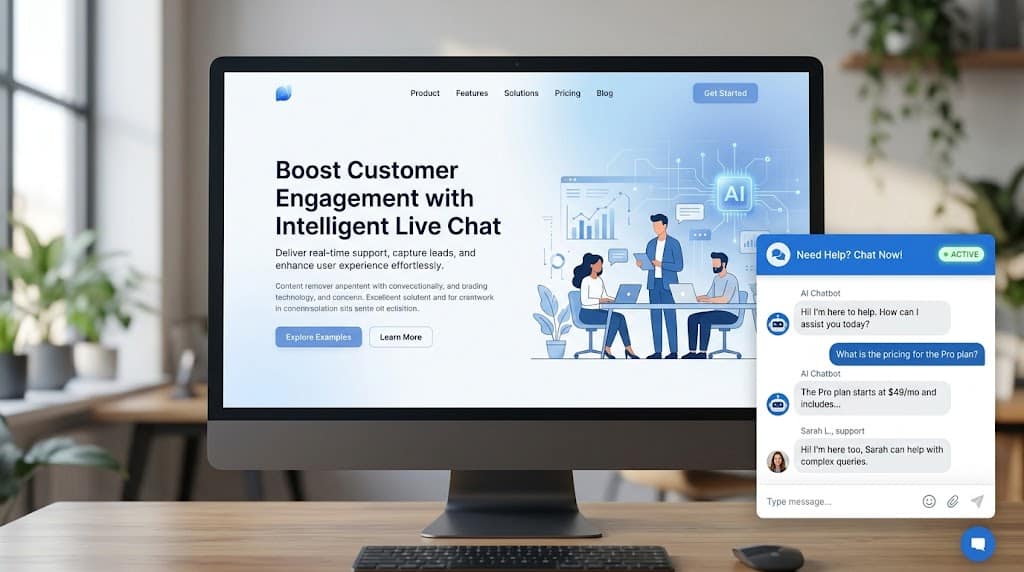
A typical live chat widget appears as a small button, usually in a corner of the screen. When visitors click it, a conversation window opens.
Depending on the website, the conversation may be handled by:
- A human customer support agent
- A rule-based chatbot
- An AI chatbot
- A combination of AI and human support
Modern live chat doesn’t necessarily mean that a human must answer every message. AI can handle routine questions while human agents take over conversations that require additional assistance.
This makes live chat particularly useful for websites that receive repetitive questions or large numbers of customer requests.
Live Chat vs. AI Chatbots
Live chat and AI chatbots are related, but they are not exactly the same.
Live chat traditionally means real-time communication between a website visitor and a human support representative.
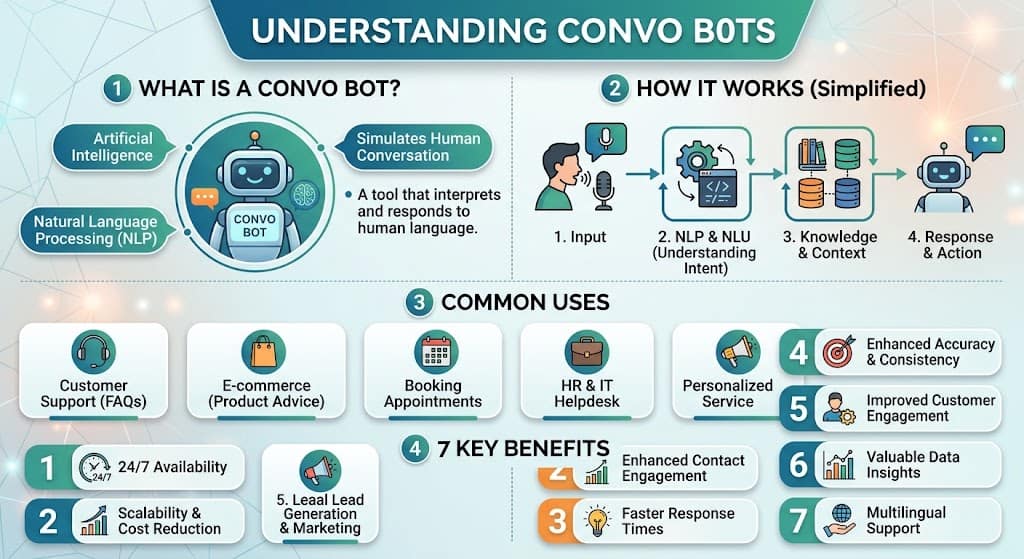
AI chatbots use artificial intelligence to understand questions and automatically provide responses or complete specific tasks.
A modern website can combine both technologies:
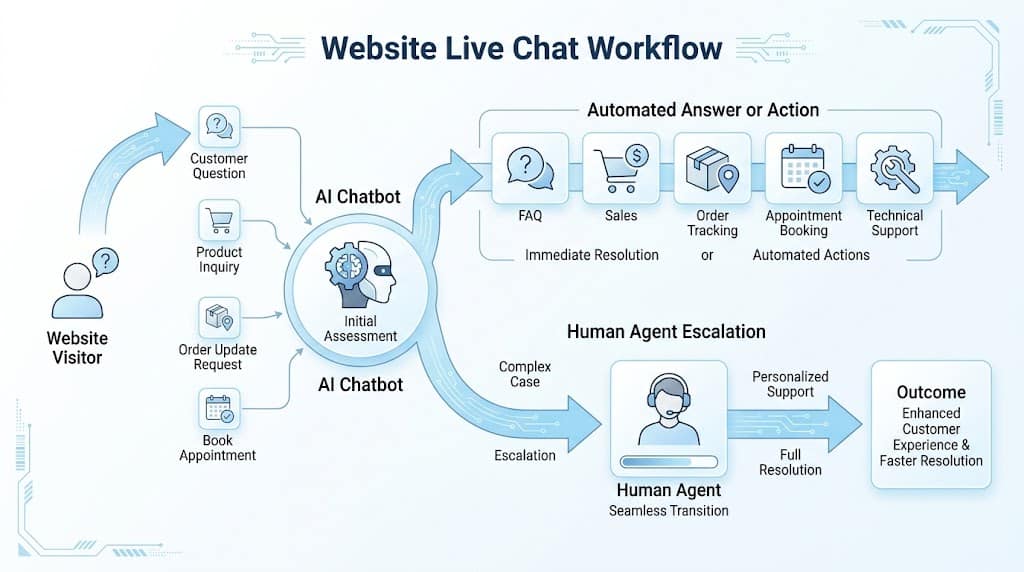
Visitor → AI chatbot → Automated answer → Human agent when necessary
This hybrid model can automate repetitive conversations without completely removing human support.
HubSpot explains how customer-service chatbots can answer questions, retrieve information, route conversations, and escalate complex issues to human agents.
11 Live Chat Website Examples
1. Customer Support Live Chat
Customer support is one of the most common uses of live chat.
A visitor might ask:
“How can I reset my password?”
Instead of searching through a help center, the visitor can open the chat widget and receive instructions immediately.
A support chatbot can answer questions about:
- Password resets
- Account access
- Returns
- Payments
- Shipping
- Product features
- Subscriptions
- Technical problems
- Business hours
For businesses receiving hundreds of similar questions, automating simple requests can reduce repetitive work for support teams.
Best for: SaaS companies, e-commerce stores, technology businesses, and service providers.
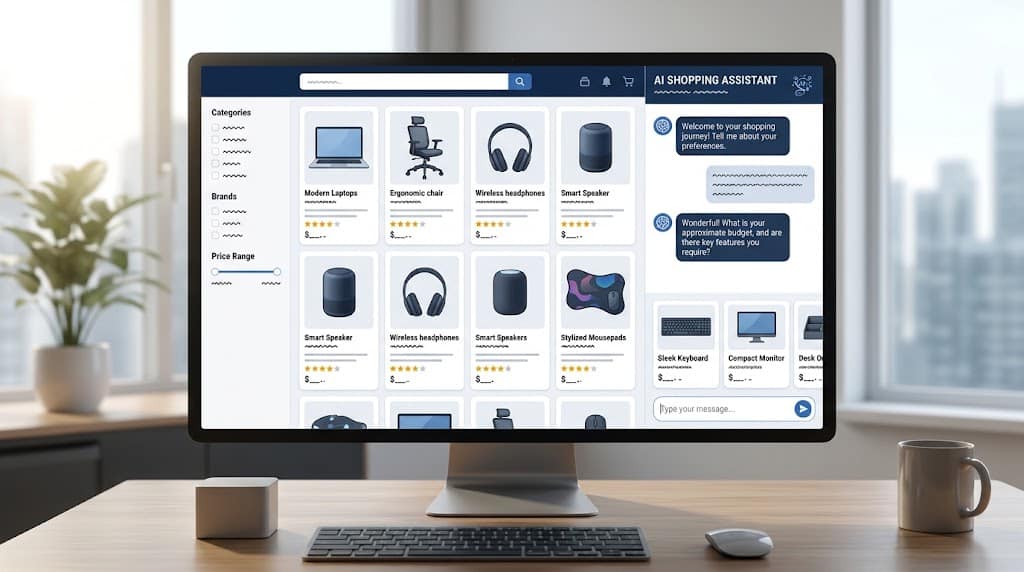
2. E-Commerce Product Recommendation Chat
Online stores can use live chat to help visitors find products.
For example, a customer could ask:
“I need a laptop for university and programming.”
Instead of forcing the visitor to browse hundreds of products, an AI assistant could ask follow-up questions about:
- Budget
- Intended use
- Preferred features
- Operating system
- Experience level
The chatbot can then recommend suitable products.
A similar approach can be used for clothing, electronics, software, furniture, travel products, and many other categories.
Best for: E-commerce stores, electronics retailers, fashion websites, and online marketplaces.
3. Sales and Lead Generation Chat
Live chat can also help businesses generate leads.
Imagine someone visits a software company’s pricing page. Instead of leaving without contacting the business, the website could display:
“Need help choosing a plan?”
The chatbot can ask qualifying questions such as:
- What type of business do you operate?
- How many employees do you have?
- Which features do you need?
- What is your approximate budget?
- Would you like to schedule a demo?
The information can then be passed to a sales representative.
Best for: SaaS companies, agencies, consultants, B2B businesses, and professional services.
4. SaaS Website Onboarding Chat
Software companies can use AI chat to help new users understand their products.
For example:
Visitor: How do I create my first project?
AI Assistant: Open your dashboard, select “Projects,” and choose “Create New Project.”
An onboarding chatbot can also help users with:
- Account setup
- Dashboard navigation
- Team invitations
- Integrations
- Billing
- Product features
- Documentation
- Getting-started tutorials
This can make the first few minutes of using a new application much easier.
Best for: SaaS platforms, CRM software, project management tools, productivity apps, and developer platforms.
5. Order Tracking Chatbot
Another practical live chat website example is order tracking.
Customers frequently ask:
“Where is my order?”
Instead of requiring customers to navigate through multiple pages, an AI chatbot can request the order number and provide the latest available status.
A typical workflow could be:
- Customer opens the chat.
- Customer selects Track My Order.
- Chatbot requests the order number.
- The system retrieves the order information.
- The customer receives the latest status.
This is a useful automation opportunity because order-status questions are usually structured and repetitive.
Best for: E-commerce stores, delivery services, marketplaces, and online retailers.
6. FAQ Chatbot
A website can use an AI chatbot as an interactive FAQ assistant.
Instead of asking visitors to search through a long FAQ page, the chatbot allows them to ask questions naturally.
For example:
Visitor: Do you offer international shipping?
Chatbot: Yes. We ship to selected international destinations. Delivery times and costs depend on the destination.
Other common questions include:
- What payment methods do you accept?
- How long does delivery take?
- Do you offer refunds?
- What are your business hours?
- Where are you located?
- How can I contact support?
An FAQ chatbot is particularly useful when a website receives the same questions repeatedly.
Best for: Almost every business website.
7. Appointment Booking Chat
Service businesses can use website chat to help visitors schedule appointments.
For example:
Chatbot: What service would you like to book?
Visitor: Consultation.
Chatbot: What day works best for you?
The chatbot can then collect the required information and direct the visitor to an available appointment slot.
This can reduce friction because visitors don’t necessarily need to search for a separate booking page.
Best for: Consultants, salons, clinics, agencies, repair services, tutors, and professional businesses.
8. Technical Troubleshooting Chat
Technology companies can use AI chat to provide first-level technical support.
For example:
“My application isn’t syncing.”
The chatbot can ask diagnostic questions and guide the user through possible solutions.
A basic troubleshooting flow might look like:
- Identify the problem.
- Ask when the problem started.
- Check common settings.
- Recommend a solution.
- Ask whether the issue is resolved.
- Escalate to a human agent if necessary.
The chatbot should not continue giving generic answers when it cannot solve the problem. A clear escalation option is essential.
Best for: Software companies, hosting providers, IT services, electronics companies, and technology platforms.
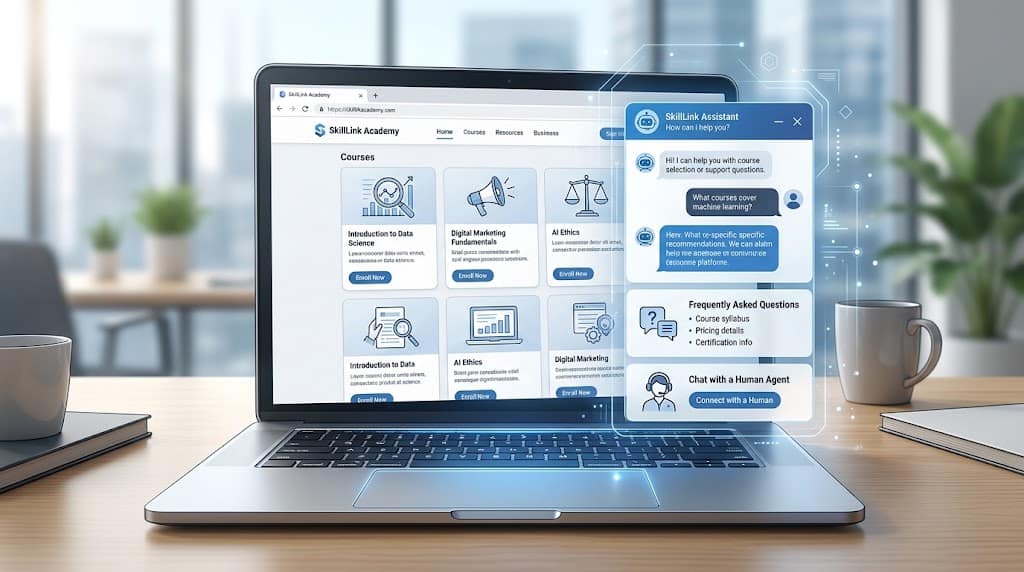
9. Educational Website Chatbot
Educational websites can use AI chat to help visitors find relevant information.
For example:
“Which course should I choose if I want to learn web development?”
An AI assistant can explain available courses and help visitors understand:
- Course levels
- Prerequisites
- Learning paths
- Class schedules
- Tuition information
- Course content
- Technical requirements
This can turn a static education website into a more interactive experience.
Best for: Online learning platforms, schools, universities, training companies, and educational websites.
10. Proactive Website Chat
Not every visitor will start a conversation.
Businesses can use proactive chat to offer assistance when visitor behavior suggests that help might be useful.
For example, someone spends several minutes on a pricing page. The website could display:
“Have questions about our plans? We can help.”
This can encourage visitors to ask questions before leaving.
However, proactive chat should not become intrusive. If the same pop-up repeatedly interrupts visitors, it can negatively affect the user experience.
A better approach is to make the message relevant to the page and visitor journey.
Best for: SaaS websites, e-commerce stores, financial services, and high-value service businesses.
11. AI + Human Live Chat
One of the strongest live chat website examples is a hybrid AI and human support system.
The AI chatbot handles simple requests while human agents deal with complex conversations.
For example:
Visitor: I want to return my order.
AI: I can help with that. May I have your order number?
The chatbot retrieves the relevant information and explains the return procedure.
The visitor then says:
“The product arrived damaged and I need a replacement.”
At this point, the system can transfer the conversation to a human agent.
This approach combines automation with human judgment.
A good AI chatbot should know not only how to answer, but also when not to answer.
What Makes a Good Live Chat Website Example?
Adding a chat icon to a website is not enough.
A good live chat experience should be:
Fast
Visitors expect chat to provide a quicker experience than traditional email support.
Helpful
The chatbot should actually solve problems instead of repeatedly directing visitors to generic pages.
Conversational
Visitors should be able to ask questions naturally rather than memorizing specific commands.
Easy to Use
The chat widget should be visible without blocking important website content.
Transparent
Users should understand whether they are communicating with an AI chatbot or a human.
Easy to Escalate
If the chatbot cannot solve the problem, visitors should have a clear way to contact a human.
Zendesk’s current live-chat guidance emphasizes the real-time nature of chat and the importance of responding quickly to customer requests.
Best Live Chat Features for Websites
When choosing or building a live chat system, consider features such as:
- AI-powered responses
- Human-agent handoff
- Automated greetings
- FAQ automation
- Knowledge-base integration
- Lead qualification
- Appointment booking
- Order tracking
- Product recommendations
- Conversation history
- CRM integration
- Analytics
- Visitor information
- Multi-language support
- Mobile-friendly chat
- Custom workflows
Not every website needs all of these features.
A small business might only need an FAQ chatbot and contact option, while a large e-commerce company may require AI recommendations, order tracking, CRM integration, and human-agent routing.
How to Create a Live Chat Experience for Your Website
You don’t necessarily need to build an advanced AI system from scratch.
Start with the questions your visitors ask most often.
Step 1: Identify Common Questions
Review:
- Customer emails
- Support tickets
- Contact forms
- Sales conversations
- Social media questions
- Website search queries
Look for questions that appear repeatedly.
Step 2: Choose What the Chatbot Should Handle
Start with simple use cases such as:
- FAQs
- Product information
- Order tracking
- Appointment requests
- Lead collection
- Basic troubleshooting
Avoid giving the chatbot responsibility for complicated situations before it has been properly tested.
Step 3: Build a Reliable Knowledge Base
Give the chatbot accurate information about:
- Products
- Services
- Pricing
- Policies
- Refunds
- Shipping
- Support procedures
A chatbot should work from current and reliable information.
HubSpot recommends providing AI chatbots with accurate company knowledge and regularly updating that information when products, pricing, or policies change.
Step 4: Add Human Escalation
Create clear rules for when a chatbot should transfer a conversation to a person.
Examples include:
- The visitor requests a human agent.
- The chatbot cannot answer the question.
- The customer has a complicated complaint.
- The issue requires account-specific investigation.
- The customer is dissatisfied with the automated response.
Step 5: Test Real Conversations
Don’t test only perfect questions.
Try:
- Spelling mistakes
- Short questions
- Incomplete sentences
- Follow-up questions
- Multiple questions in one message
- Unexpected requests
- Conversations that change direction
Step 6: Monitor Performance
Important metrics include:
- First response time
- Resolution rate
- Customer satisfaction
- Escalation rate
- Chat volume
- Lead conversion
- Chat abandonment
Use these metrics to identify where the chatbot needs improvement.
Common Live Chat Mistakes to Avoid
1. Making the Chatbot Too Aggressive
A chat window that repeatedly appears can frustrate visitors.
Use proactive chat only when it adds value.
2. Hiding Human Support
Customers should not feel trapped inside an automated conversation.
Provide an obvious human-agent option when appropriate.
3. Giving Generic Answers
A chatbot that constantly responds with “Please contact support” is not providing much value.
4. Using Outdated Information
Incorrect pricing, product details, or policies can damage customer trust.
5. Making Conversations Too Long
The chatbot should help visitors complete their task with as few unnecessary steps as possible.
6. Ignoring Mobile Users
The chat widget must work correctly on smartphones and tablets.
7. Measuring Only Chat Volume
More conversations do not automatically mean better customer service.
Track resolution, satisfaction, conversions, and escalation as well.
Benefits of Live Chat for Websites
Faster Customer Support
Visitors can ask questions without waiting for an email response.
Better User Experience
Customers can receive assistance while they are already browsing the website.
Reduced Repetitive Work
AI chatbots can answer routine questions and allow human agents to focus on more complicated issues.
More Sales Opportunities
Sales chat can identify visitors who need additional information before they leave the website.
24/7 Automated Assistance
AI chatbots can respond to common questions outside normal business hours.
Better Customer Insights
Chat conversations can reveal what visitors are confused about, which products they want, and what questions appear most frequently.
Live Chat Website Examples by Business Type
| Business Type | Useful Live Chat Example |
|---|---|
| E-commerce | Product recommendations and order tracking |
| SaaS | Product support and onboarding |
| Agency | Lead qualification |
| Online education | Course recommendations |
| Healthcare services | Appointment requests |
| Travel | Booking assistance |
| Finance | General information |
| Technology | Technical troubleshooting |
| Retail | Order tracking |
| Professional services | Consultation booking |
Are Live Chat and Chatbots the Same?
No.
Live chat generally refers to real-time website messaging, often involving human agents.
A chatbot automatically communicates with visitors using predefined rules or AI.
A website can use:
- Human-only live chat
- Rule-based chatbot
- AI chatbot
- AI + human hybrid support
The right option depends on the website’s goals, visitor volume, support requirements, and available resources.
Do Small Websites Need Live Chat?
Not necessarily.
A small website with limited traffic may not need an advanced AI chatbot.
However, live chat can be useful when visitors regularly ask questions or when products and services require explanation before purchase.
A small business might start with a simple FAQ chatbot and add more automation as its traffic and support requirements grow.
How Do You Choose the Right Live Chat Strategy?
Start with the problem rather than the technology.
Ask:
- What questions do visitors ask most often?
- Which questions can be answered automatically?
- Which requests require human judgment?
- Can the chatbot access accurate business information?
- What should happen when the chatbot cannot help?
- How will success be measured?
For example, an e-commerce store might start with order tracking, while a SaaS company might start with product FAQs and onboarding.
The best implementation is usually the one that solves a clear customer problem with minimal friction.
Final Thoughts
The best live chat website examples are not necessarily the websites with the most sophisticated AI.
They are the websites that use chat to solve genuine visitor problems.
An e-commerce website can use chat for product recommendations and order tracking. A SaaS company can use it for onboarding and technical support. A service business can use it for lead generation and appointment booking.
The strongest approach is often a combination of AI automation and human support.
Start with common questions, create a reliable knowledge base, make the chat easy to access, and provide a clear path to human assistance when necessary.
As AI chatbots become more capable, website chat is moving beyond simple scripted responses toward systems that can understand visitor intent, retrieve information, answer questions, and complete specific tasks.
The goal should remain simple:
Help visitors get the right answer or complete the right action with as little friction as possible.
Frequently Asked Questions
What are live chat website examples?
Live chat website examples include customer support chat, AI FAQ assistants, product recommendation chatbots, order tracking bots, sales chat, appointment booking, technical support, and AI-human hybrid chat.
What is the best live chat example for an e-commerce website?
Product recommendations, order tracking, returns assistance, and customer support are strong starting points for e-commerce websites.
Can AI chatbots replace live chat agents?
AI can automate many routine conversations, but human agents remain useful for complex, sensitive, or unusual issues. A hybrid AI and human model can provide a practical balance.
Can a chatbot generate leads?
Yes. A chatbot can ask qualifying questions, collect contact information, recommend products or services, and route qualified prospects to a sales team.
Should every website have live chat?
No. Live chat is most useful when visitors need real-time assistance or frequently ask questions that can be answered through conversation.
What is the difference between a chatbot and live chat?
A chatbot automatically communicates with visitors, while traditional live chat usually connects visitors with human agents. Modern websites can combine both.
How can I improve my website’s live chat?
Identify common visitor questions, build a reliable knowledge base, make the chat easy to access, provide human escalation, and monitor metrics such as response time, resolution rate, satisfaction, and conversions.