Discover the 25 best AI image generators in 2026. Compare free and paid tools for photorealism, typography, marketing, and commercial use.
If you’ve tried to pick an AI image generator this year, you already know the problem: there are dozens of tools, every “best of” list recycles the same five names, and pricing pages hide the real limits behind vague words like “credits” and “fast generations.” The result is wasted signups, watermarked outputs you can’t actually use, and hours lost comparing tools that all claim to be “the best.” The solution is a single, organized comparison — built around real use cases (free vs. paid, photorealism vs. typography, marketing vs. anime art) instead of hype — so you can match the right tool to your actual project in minutes, not days. That’s exactly what this guide does: 25 AI image generators, tested categories, transparent pricing notes, and clear picks for every budget and skill level.
What Is an AI Image Generator?
An AI image generator is a tool that turns a text prompt (and sometimes a reference image) into a new picture using a machine learning model. Most rely on diffusion models, which start from random visual noise and gradually refine it into a coherent image guided by your prompt. A newer wave of tools, including the GPT-Image family, generates images token by token, similar to how a language model writes text. Both approaches can produce photorealistic photos, illustrations, logos, and product mockups — the difference shows up in speed, text rendering, and how well the tool preserves details across edits.
How We Evaluated These AI Image Generators
To keep this list grounded in evidence rather than marketing copy, each tool below was assessed on the same criteria used by independent benchmark trackers and hands-on review sites: prompt accuracy, photorealism, text/typography rendering, editing and consistency across multiple generations, generation speed, free-tier limits, watermark policy, and commercial licensing terms. Where tools are closely matched, ties were broken by price-to-quality ratio. This mirrors how leading benchmark platforms rank models — using blind side-by-side comparisons rather than self-reported claims — which is a big part of why “best” lists disagree with each other so often.
Quick Comparison: Best AI Image Generators by Category
| Category | Top Pick | Free Option? |
|---|---|---|
| Best overall | Nano Banana 2 (Gemini) | Yes |
| Best arena-ranked | GPT Image 2 | Paid |
| Best for typography/logos | Ideogram 3 | Freemium |
| Best fully free | Adobe Firefly | Yes |
| Best for anime | Midjourney Niji 6 | Paid |
| Best for marketers | ImagineArt | Freemium |
| Best open-weight | FLUX.1 Kontext | Yes |
| Best commercially safe | Getty Generative AI | Paid |
Best Overall AI Image Generators in 2026
1. Nano Banana 2 (Gemini 3.1 Flash Image) — Google’s model combines strong text-to-image generation with inpainting-style editing and noticeably faster rendering than its predecessor. It’s free to use inside the Gemini app, which is a big reason it tops most 2026 rankings.
2. GPT Image 2 (OpenAI) — Currently leads the major blind-vote benchmark arenas for both text-to-image and image editing, with the largest first-to-second Elo gap those leaderboards have recorded. Conversational refinement inside ChatGPT (“make the lighting warmer, move the cup left”) is its standout feature.
3. Seedream 4 (ByteDance) — Produces crisp 4K output and supports multiple reference images for consistent brand assets, trading a little photorealism for speed and resolution.
4. Nano Banana Pro — Built on Gemini 3 Pro; the community’s most-recommended free option for everyday work since its late-2025 launch.
5. Imagen 4 (Google) — Fast, reliable, and geared toward rapid concept testing rather than final production assets.
Best Free AI Image Generators (No Watermark)
6. Adobe Firefly — Trained only on licensed Adobe Stock and public-domain content, making it one of the few tools that’s both free-tier friendly and commercially safe out of the box.
7. Bing Image Creator / Microsoft Designer — Free access to a DALL-E 3-based model through a Microsoft account, with a daily allotment of fast generations plus a slower unlimited queue.
8. Google ImageFX — Powered by Google’s Imagen models, known for strong photorealism and a simple interface.
9. Perchance — No account, no email, no credit card. Runs Stable Diffusion variants with fewer content restrictions than most corporate tools.
10. Craiyon — Unlimited free generations at lower quality; best for brainstorming rather than professional output.
11. FLUX.1 Schnell — Open-weight and free via Hugging Face Spaces, with no usage limits — a favorite among developers who want to self-host.
Best AI Image Generators for Professionals and Marketers
12. ImagineArt — A full creative suite offering dozens of image models plus prompt-writing assistance, aspect-ratio controls, and lighting/camera presets built for campaign work.
13. Leonardo.Ai — A production favorite for game art and concept design, with asset libraries, prompt history, and model-switching between photorealism, anime, and fantasy styles.
14. Recraft — Stands out less for the base model and more for the tooling built around it, including vector-style outputs useful for branding assets.
15. Canva AI — Best suited to teams who already live inside Canva’s design ecosystem and want image generation without leaving the editor.
16. Krea AI — Popular for real-time generation and style-transfer workflows, especially among designers iterating quickly on concepts.
Best for Typography, Logos, and Text in Images
17. Ideogram 3 — Still the most reliable model for rendering readable, accurately spelled text inside generated images — a persistent weak spot for most competitors, which makes it the default choice for posters, packaging, and logo concepts.
Best for Anime and Stylized Art
18. Midjourney Niji 6 — Built specifically for anime aesthetics in collaboration with Spellbrush, with support for embedded Japanese and Chinese typography and finer control over illustrative detail than Midjourney’s standard model.
19. Qwen Image (Alibaba) — The strongest option for non-English prompts, handling Chinese, Arabic, and Spanish with notably accurate lighting, reflections, and skin tones.
Best for Photorealism
20. Emu 3.5 (Meta) — Frequently cited as producing the most realistic images available, though generation is slower and more expensive than most alternatives.
21. Raphael AI — Unlimited generation with no signup, built on FLUX-based architecture, and competitive with hosted FLUX Schnell instances for realism.
Best for Production Workflows and Consistency
22. FLUX.1 Kontext — Designed to preserve character identity and style across repeated edits, with open-weight dev, pro, and max tiers for teams that need reproducible output.
23. Kling O1 Image — A multi-reference tool aimed at keeping visual consistency across an entire content series, useful for episodic marketing content.
24. Luma AI — Known primarily for video diffusion, Luma bridges static image generation and motion graphics for teams producing both.
Commercially Safe and Copyright-Cleared Options
25. Getty Generative AI — Built specifically for commercial publishers who need guaranteed copyright-safe output backed by Getty’s licensing indemnification — the safest option when legal exposure is the top priority.
How to Choose the Right AI Image Generator
Match the tool to the job rather than chasing whichever name trends this month:
- Need speed and zero cost? Start with Nano Banana 2, Adobe Firefly, or Bing Image Creator.
- Need pixel-perfect text or logos? Use Ideogram 3.
- Need guaranteed commercial safety? Adobe Firefly or Getty Generative AI.
- Need consistent characters across many images? FLUX.1 Kontext or Kling O1 Image.
- Need the highest-ranked raw quality? GPT Image 2 currently tops the major benchmark arenas.
If you’re building out a broader content workflow around AI tools, our guide to choosing AI tools for content teams walks through the same decision framework in more depth, and our AI content strategy resources cover how to plug generated visuals into a publishing pipeline.
Free vs. Paid: Which Should You Choose?
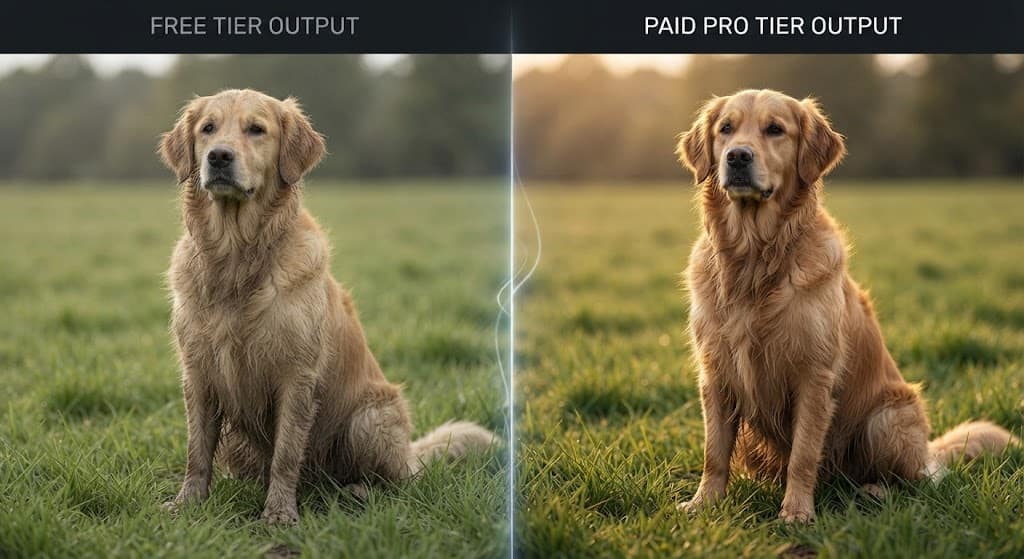
Free tiers in 2026 are genuinely usable — Google’s free plan alone offers roughly 100 images a day at high resolution, and Adobe Firefly’s free credits come with no watermark. The tradeoffs are daily generation caps, slower queues, and fewer editing controls. Paid plans matter most when you need volume, priority speed, multi-reference consistency, or airtight commercial licensing for client work. For occasional personal projects, a free tool is almost always enough; for agencies and marketing teams shipping daily content, a paid plan pays for itself in saved time. See our breakdown of AI tool pricing tiers for a closer look at how credit systems actually work across providers.
For deeper, continuously updated benchmark data, independent leaderboards like Artificial Analysis and open model repositories on Hugging Face are worth bookmarking, since rankings shift every few months as new models ship.
Conclusion
The AI image generation market in 2026 no longer has one obvious winner — it has specialists. Nano Banana 2 and GPT Image 2 lead on raw quality and are the safest default picks, Ideogram 3 remains unmatched for text and typography, Adobe Firefly and Getty are the clearest choices when copyright safety is non-negotiable, and open-weight options like FLUX give developers full control without a subscription. Rather than picking whatever tool is loudest this month, match your choice to the job in front of you: quick free experiments, professional marketing output, anime-style art, or airtight commercial licensing. Start with the free tiers on this list, test two or three against your actual prompts, and upgrade only once you hit a real limit.
Frequently Asked Questions
1. What is the best free AI image generator in 2026?
Nano Banana 2 inside the Gemini app and Adobe Firefly are generally considered the strongest free, watermark-free options, offering high daily limits and commercially usable output.
2. Which AI image generator is best for commercial use?
Adobe Firefly and Getty Generative AI are the safest choices, since both are trained on licensed content and offer clearer usage rights than tools built on scraped datasets.
3. Can I use AI-generated images for client or business work?
It depends on the tool’s license. Firefly and Getty explicitly allow commercial use; Midjourney and several open-source models require a paid plan or carry usage conditions, so always check the current terms before using an image commercially.
4. What’s the difference between diffusion models and GPT-Image-style generators?
Diffusion models build an image by refining random noise step by step, while GPT-Image-style models generate images token by token, similar to text generation. Both can produce high-quality results, but the newer token-based approach tends to handle conversational, multi-step edits more smoothly.
5. Which AI image generator is best for logos and text?
Ideogram 3 remains the top choice for rendering accurate, readable text and typography inside generated images, a task most other models still struggle with.