Discover the best AI video generators of 2026. Learn how text-to-video tools like Google Veo 3.1 and Sora 2 work, compare top platforms, and find the right fit for your workflow.
Most people who want to make a video still run into the same wall: no camera crew, no editing skills, no budget, and no time. A single 30-second product clip used to mean booking a studio, hiring actors, and spending days in an editing timeline. That gap between “I have an idea” and “I have a finished video” is exactly what stops most creators, marketers, and small businesses from publishing video content at all.
An AI video generator closes that gap. Instead of filming anything, you type a description, upload a photo, or paste a script, and the tool generates a finished clip — complete with motion, lighting, and often voice and sound — in a few minutes. In this guide, you’ll learn exactly what AI video generators are, how the technology behind them works, which tools are worth using in 2026, and how to pick the right one for your workflow.
What Is an AI Video Generator?
An AI video generator is software that creates video content from a simple input — usually a text prompt, an image, or a short script — without filming, actors, or manual editing. The system interprets what you’ve described (the subject, action, setting, and mood) and produces a video that matches it, frame by frame.
Modern tools go well beyond silent animated clips. Many AI video generators now add synchronized dialogue, sound effects, background music, and camera movement automatically, so a single prompt can produce something close to a finished, publish-ready video.
How Do AI Video Generators Work?
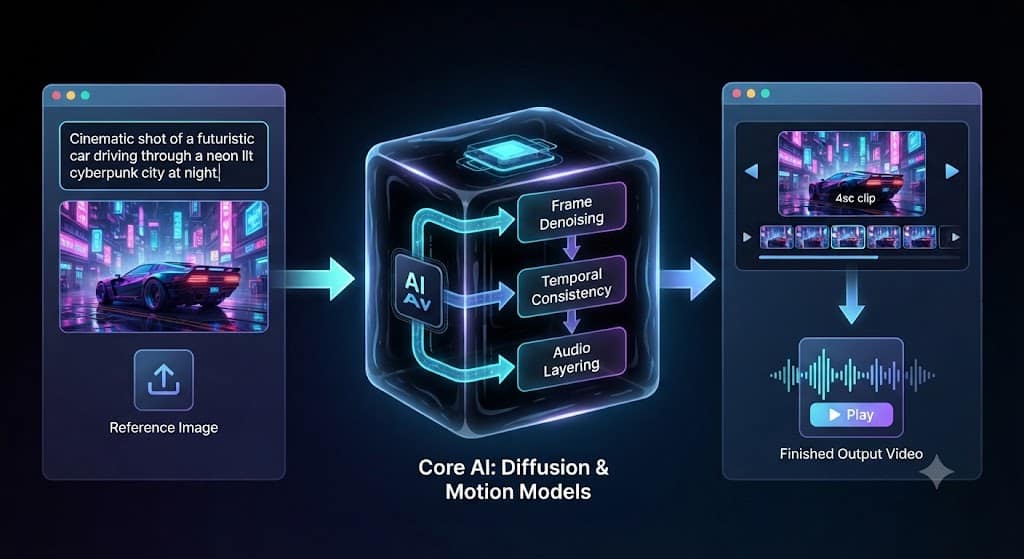
At the core of most AI video generators is a diffusion model — the same underlying technique used in AI image generators like DALL·E and Stable Diffusion. The process generally works like this:
- Prompt interpretation – The AI reads your text prompt, script, or reference image and identifies the subject, action, camera angle, and style you’re describing.
- Frame generation – Starting from visual noise, the model gradually “denoises” the footage over many steps, refining it frame by frame until it matches your description.
- Motion and consistency – The system predicts how objects, characters, and cameras should move between frames, aiming to keep faces, lighting, and physics consistent across the clip.
- Audio layering – Many current-generation tools add native audio, lip-sync, sound effects, or a voiceover in the same generation pass, rather than as a separate step.
Because two generations from the identical prompt can produce different motion, lighting, or composition, most creators generate a few variations and pick the strongest one rather than expecting a perfect result on the first try.
The 4 Types of AI Video Generation
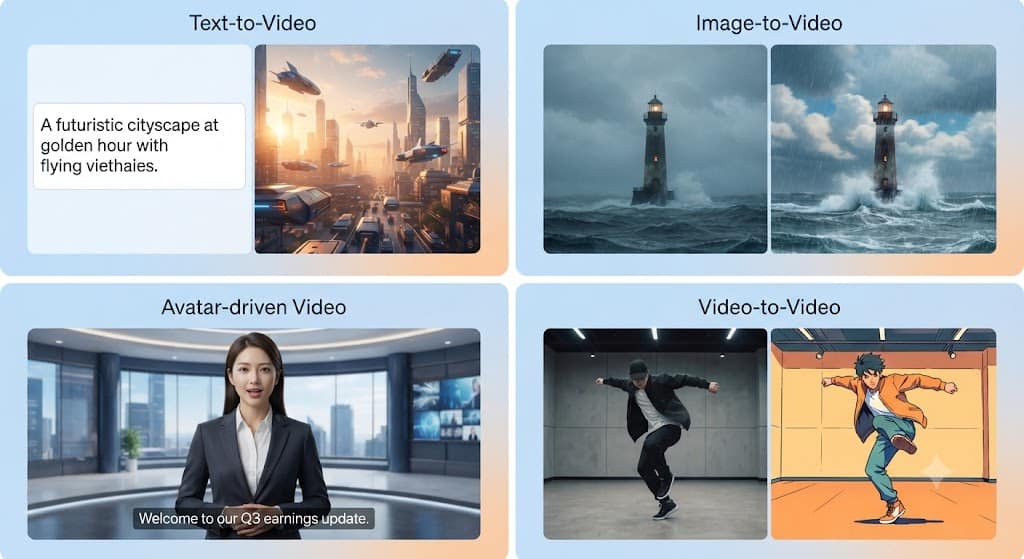
Not every AI video generator does the same job. Broadly, the category splits into four types:
- Text-to-video – You type a written description and the AI builds the scene from scratch. Best for concept videos, social clips, and stylized content.
- Image-to-video – You upload a photo and the AI animates it, adding camera movement, motion, or a talking presenter. Useful when you need to stay close to an existing visual.
- Avatar-driven video – A digital presenter delivers a script in your chosen voice and language, without ever being filmed. Common for training videos, product explainers, and multilingual content.
- Video-to-video – An existing clip is restyled, edited, or enhanced using AI, useful for smoothing motion or applying a new visual style to raw footage.
Best AI Video Generators in 2026
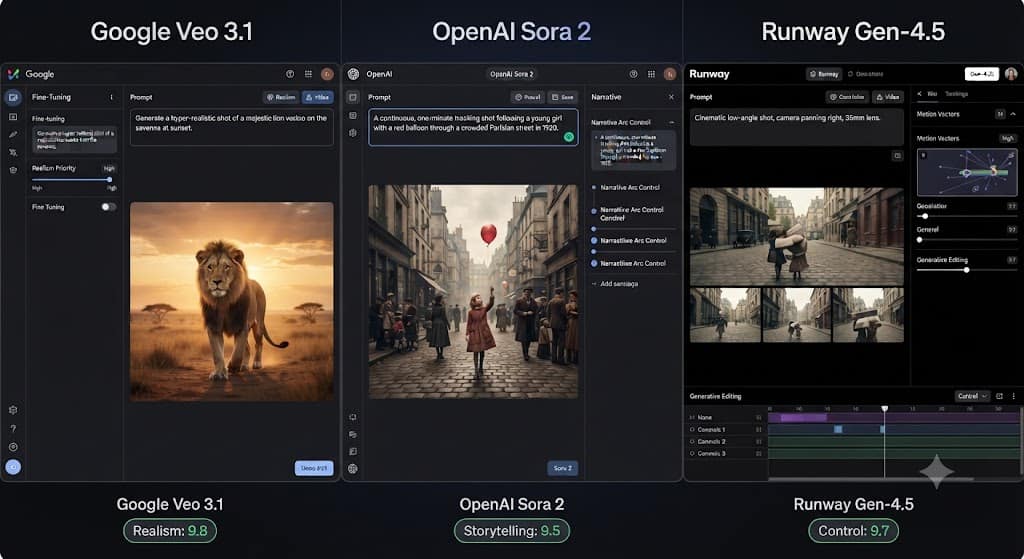
Here’s an overview of the tools worth knowing this year, based on what each one is actually built to do best.
Google Veo 3.1
<cite index=”4-1″>Google’s Veo 3.1 model is widely regarded as the strongest AI video generation all-arounder</cite>, combining prompt adherence with realistic visuals and integrated audio. It’s a strong first choice if you only want to learn one tool.
OpenAI Sora 2
<cite index=”1-1″>Sora 2 fits narrative concepting and polished visual mood</cite>, and it remains a favorite for cinematic storytelling and short-form creative concepts. You can explore examples directly on OpenAI’s Sora page.
Runway Gen-4.5
<cite index=”1-1″>Runway Gen-4.5 fits camera control and generative editing</cite>, making it the go-to choice for creators and motion designers who want precise, directable shots rather than pure randomness.
Kling 3.0
<cite index=”3-1″>Kling AI has built its reputation on generating photorealistic human characters and movements</cite>, with <cite index=”3-1″>strong lip-sync capabilities and fast generation times</cite> — a solid pick for talking-head and dialogue-driven content.
PixVerse V6
<cite index=”1-1″>PixVerse V6 is built for creators who need multi-shot generation, native audio, and repeatable testing</cite>, which makes it useful for producing a consistent batch of short-form clips.
Luma Ray / Dream Machine
Luma is known for speed and accessibility — it turns a rough idea into a short clip in minutes, which is why it’s popular for fast social content and quick concept testing.
Seedance 2.0
<cite index=”7-1″>Seedance 2.0 shows the strongest prompt adherence with up to 12 reference inputs, native audio, and clips up to 15 seconds</cite>, making it a strong option for realistic, commercial-grade footage.
HeyGen and Synthesia (Avatar Tools)
Rather than generating an entirely new scene, these platforms animate a digital presenter reading your script — ideal for corporate training, onboarding, and localized marketing videos in multiple languages.
If you’re also exploring the broader AI content stack, TechCommand’s guide to the 25 best AI image generators in 2026 is a useful companion, since several video tools (Kling, PixVerse, Seedance) share the same underlying image models used for the first frame of a clip.
Key Features to Look For When Choosing a Tool
Before you commit to a subscription, weigh these factors against your actual use case:
- Output length and resolution – Most tools cap free clips at 4–15 seconds; check whether paid tiers unlock 1080p or longer runtimes.
- Native audio and lip-sync – <cite index=”6-1″>native audio generation with sound effects that match the action and accurate lip-syncing</cite> is now standard in top-tier tools, but weaker in budget options.
- Commercial usage rights – <cite index=”6-1″>most “free” plans are licensed for personal use only</cite>, so check the fine print before using generated clips in client or paid work.
- Reference inputs – Tools that accept multiple reference images give you more control over character consistency across shots.
- Credit-based pricing – Premium models burn through credits far faster than budget ones, so estimate your monthly clip volume before choosing a plan.
Who Uses AI Video Generators (Real Use Cases)
- Marketers and ad teams – Generating multiple ad concepts and testing variants without a full production shoot.
- Social media creators – Turning a single idea into short-form content for TikTok, Reels, and YouTube Shorts in minutes.
- E-commerce brands – Producing product demo videos without a physical shoot for every SKU.
- Educators and trainers – Using avatar-based tools to build multilingual course content without hiring on-camera talent.
- Game and film concept artists – Previsualizing scenes and camera moves before committing to full production.
For teams already using AI across their content pipeline, it’s worth pairing your video workflow with the tools covered in TechCommand’s ultimate guide to artificial intelligence in 2026, which breaks down how generative AI fits into broader content and marketing operations.
Tips for Writing Better AI Video Prompts
The quality of your output depends heavily on how you structure your prompt. A few practical guidelines:
- Describe the subject clearly – Who or what is in the shot, including appearance and clothing.
- Specify the action – What is happening, and how (slowly, quickly, dramatically).
- Set the scene – Location, lighting, time of day, and atmosphere.
- Direct the camera – Mention pans, tilts, zooms, or static shots if the tool supports camera control.
- Name the style – Cinematic, animated, documentary, or photorealistic — vague prompts produce generic results.
If you’re building out a broader content workflow around AI tools, TechCommand’s roundup of the best free AI tools to try in 2026 covers several no-cost options worth testing alongside your video generator.
Limitations and Challenges to Know
AI video generation has improved fast, but it isn’t flawless. Common issues still include distorted hands and fingers, inconsistent faces across frames, unnatural physics during fast movement, and audio that doesn’t quite sync with the visuals. Free tiers are also often restricted to short clips and non-commercial use, so budget for a paid plan if you need longer, license-cleared output. Treat generated clips as a strong first draft — most professional workflows still involve picking the best of several generations and doing light editing afterward.
Conclusion
AI video generators have gone from a novelty to a genuinely useful production tool in the space of a couple of years. Whether you need a cinematic concept clip, a fast social video, or a multilingual training presenter, there’s now a tool built specifically for that job — Veo 3.1 for realism, Sora 2 for storytelling, Runway for camera control, Kling for lifelike characters, and avatar tools like HeyGen for scripted presentations. The technology still has rough edges, particularly around physics and fine detail, but for most everyday content needs, an AI video generator can now replace what used to require a camera, a crew, and a full day of editing. Start with a free tier, test a few tools against the same prompt, and match the platform to the specific job rather than looking for one tool that does everything.
Frequently Asked Questions
1. What is the best free AI video generator?
Luma Dream Machine and Kling’s free tier are among the most usable free options, though both cap clip length and restrict output to non-commercial use. Free credits also don’t typically refresh once used.
2. Can I use AI-generated videos for commercial projects?
It depends on the plan. <cite index=”6-1″>Most free plans are licensed for personal use only</cite>, so you’ll usually need a paid subscription to legally use AI-generated clips in ads, client work, or monetized content.
3. How long can AI-generated videos be?
Most tools generate clips between 4 and 20 seconds per single generation. Longer videos are typically built by generating multiple short clips and stitching them together in an editor.
4. Do AI video generators add sound automatically?
Increasingly, yes. <cite index=”6-1″>Native audio generation, with sound effects that match the action and accurate lip-syncing, is now a leading trend</cite> among top-tier tools like Veo, Kling, and Seedance, though budget tools may still produce silent clips.
5. Which AI video generator is best for beginners?
Tools with simple, guided interfaces — like Luma or Canva’s AI video generator — tend to be the easiest starting point, since they don’t require prompt engineering experience or a technical workflow to get a usable result.
Sources: Comparative tool data referenced from Zapier’s AI video generator roundup and other 2026 industry reviews.